


Introduction: From Rigid Code to Digital Agility
Since its invention by Tim Berners-Lee, the World Wide Web has undergone an evolution comparable to the Industrial Revolution. In the beginning, the web was an archive of static documents. HTML (Hypertext Markup Language) was the paper we wrote on. If you wanted to change something, you had to re-write the paper. For the early 2000s, this was acceptable. User expectations were low, competition was manageable, and marketing cycles were measured in quarters, not hours.
Let's jump to 2026. A corporate website is no longer a digital shop window that you decorate once and then let gather dust for years. It is the heart of your brand communication, your best sales representative, and often the first touchpoint with potential customers. In this environment, "Time-to-Market" is the all-important currency. If your marketing team needs a landing page for a spontaneous campaign, you cannot afford to wait three days for a developer to manually move HTML tags.
Nevertheless, an astonishing number of medium-sized companies stick to so-called "legacy architectures": Static HTML pages that are "mastered" by a single person. The reasons are often historically grown or based on the misconception that "no CMS" is synonymous with "more security."
In this detailed deep-dive, we analyze why this model is obsolete. We highlight the technical, business, and strategic reasons that argue for a switch to a modern Content Management System (CMS) like WordPress. We show you how a migration works, which risks you must avoid, and why the step to WordPress makes your business scalable.
Dieser Artikel ist ein vertiefender Fachbeitrag aus unserem Content-Cluster. Entdecken Sie die vollständige Übersicht auf unserer Hauptseite: WordPress to Next.js Migration →
Chapter 1: The Problem of "Hand-Coded HTML" – A Cost-Benefit Analysis
The "Developer Dependency Loop"
The biggest problem with static pages is not of a technical nature, but organizational. It is the dependence on technical professionals for non-technical tasks. Let's run through a typical process in a company with a static website:
Scenario: Changing a Phone Number in the Footer
- Step 1: Marketing notices the old number. An email goes to IT or the external agency.
- Step 2: Ticket creation or waiting for a reply (Duration: 4-24 hours).
- Step 3: The developer opens the FTP client, downloads the files, finds the line in the code, changes it, uploads it.
- Step 4: Invoicing for 15 minutes of "Support & Maintenance."
What happens here is a massive waste of resources. A highly qualified (and expensive) developer carries out a trivial text change. Worse still: If this change has to be made on 50 subpages and no central template system is used, the effort multiplies.
The Marketing Nightmare: Lack of Experimentation
Modern marketing is based on A/B testing and fast iterations. Does headline A work better than headline B? Does the blue button convert better than the red one? On a static HTML page, such tests are a technical feat. The result: They are not done at all.
Websites that are hard to change are rarely changed. This is called "Content Stagnation". Google recognizes that your site has not been updated for months and classifies it as less relevant. Your competition, publishing blog posts and news daily, overtakes you in the ranking. The static site thus becomes an active competitive disadvantage.
Important Insight:
"The cost of a website is measured not only in hosting fees, but in the opportunity costs of missed chances. Every idea that is not implemented because the technical hurdle is too high is lost revenue."
Scalability Driven Into a Wall
Imagine your company is growing. You want to integrate a press area, a blog, a career portal, and perhaps a small shop. With pure HTML, every new page means manual copying of code. The menu must be adjusted on all existing pages. Footers must be synchronized. From about 20 subpages, maintenance becomes exponentially more complex and error-prone. A forgotten closing `<div>` tag can break the layout of the entire page.
Chapter 2: Why WordPress? A Look into the Ecosystem
More Than Just Blogging: WordPress as an Application Framework
A common misconception is that WordPress is "only for blogs". That may have been true in 2010. Today, WordPress powers over 43% of the entire internet, including sites from Sony Music, Time Magazine, and even the White House (at times).
WordPress has evolved into a full-fledged Application Framework. With the REST API, you can use WordPress as a "backend" and feed any frontends (apps, React sites) with it.
The Gutenberg Editor: "What You See Is What You Get" Redefined
With the introduction of the block editor (Gutenberg), WordPress has revolutionized the way content is created. Authors no longer write in an abstract text field but build their page from modular blocks. Headlines, galleries, buttons, quotes – everything are blocks that can be moved via drag-and-drop.
For your editors, this means: They see almost exactly what the result will look like while writing. No surprises after clicking "Publish."
The Plugin Universe: Functionality on Demand
One of the strongest advantages of a CMS is its extensibility. Do you need SEO features? Install Yoast or RankMath. Do you need security scans? Wordfence. Caching? WP Rocket. Contact forms? Gravity Forms.
In a hardcoded environment, for a contact form you would have to: 1. Build the HTML form. 2. Write a PHP script (or Node.js backend) to process the data. 3. Program SMTP integration for email sending. 4. Implement validation (spam protection). 5. Set up database storage.
In WordPress, you install a plugin, drag the fields together, and are live in 10 minutes. The time savings are enormous.
User Roles and Governance
In large companies, not everyone is allowed to do everything. The intern should write blog articles but not be allowed to publish them. The HR manager should only have access to the career section. WordPress inherently offers a granular role and rights system (Administrator, Editor, Author, Contributor) that is completely absent in static files – where anyone with the FTP password has access to everything.
Chapter 3: The Migration Process – A Technical Guide
A migration from HTML to WordPress is not a "copy-paste" process. It is a structured development process that requires expertise. At Pragma-Code, we divide this process into four phases.
Phase 1: Analysis and Componentization
Before we write a line of code, we analyze your existing HTML page. We identify recurring patterns. Is the header the same on every page? Is there a sidebar that keeps appearing? What do your "Call-to-Action" boxes look like? These patterns are broken down into so-called "Partial Templates."
Phase 2: Custom Theme Development (The Clean Way)
There are tools that promise to automatically convert HTML into WP. We advise against it. The generated code is often bloated and hard to maintain. The professional way is the development of an individual theme (Custom Theme).
- Setup: Installation of a clean WordPress instance.
- style.css: Transfer of your existing CSS styles so that the design is preserved 1:1.
- header.php & footer.php: Outsourcing of the global areas.
- front-page.php: Creation of the homepage.
- page.php: The default template for all content pages.
Here we use PHP to replace the static texts with dynamic WordPress functions like `the_title()` or `the_content()`.
Phase 3: Advanced Custom Fields (ACF)
Standard WordPress has a title and a large text field. But what about complex designs? Does your "About Us" page have team profiles with image, name, and LinkedIn link? Here ACF comes into play. We create tailored input masks in the backend. Your editor then won't see a huge block of text, but rather fields like "Employee Name", "Upload Photo", "Job Title". This guarantees that the design (layout) remains strictly separated from the content. No one can accidentally ruin the layout.
Phase 4: Content Migration and QA
Now the content is transferred. For small sites (up to 20 subpages) this is often done manually, to simultaneously carry out a "Content Audit" (update/delete texts). For large sites, we write scripts that parse the old HTML and automatically inject it as posts into the WordPress database.
The most important step: Quality Assurance (QA). We check every link, every form, and above all the mobile view on different devices.
Chapter 4: SEO, Performance, and Myths
Myth: "Static pages are faster than WordPress"
Technically speaking, a raw HTML file delivered directly from the server is the fastest thing there is. As soon as PHP and database queries are added, latencies occur. This is correct. BUT: In practice, the difference is negligible with the right configuration or even the reverse.
Modern WordPress setups use caching plugins that do exactly that: They generate static HTML files from the dynamic PHP pages and store them in the cache. For the visitor, a static file is therefore still delivered. Combined with a CDN (Content Delivery Network) like Cloudflare, WordPress sites today achieve "Lighthouse Scores" of 100/100.
In addition, hand-coded HTML pages tend to contain unoptimized images (who manually scales down every image to WebP?). WordPress can automatically compress images upon upload and convert them into modern formats. Net, the WordPress site is often faster for the end user.
SEO Powerhouse Through Automation
Search Engine Optimization (SEO) is grunt work. Meta-Descriptions, Canonical Tags, Open Graph Tags for Facebook/LinkedIn, XML Sitemaps, Schema.org Markup (JSON-LD). Maintaining all this manually in HTML is a source of error. A forgotten tag can lead Google to ignore a page. In WordPress, plugins completely take over this technical SEO. You just enter the focus keyword, the system takes care of the code.
Chapter 5: The Future – Headless CMS and Hybrid Approaches
For companies looking for absolute high-end performance and maximum security, there is a "third way" that combines the best of both worlds: Headless WordPress.
Here, WordPress is "decapitated" (Headless). You continue to use the comfortable backend of WordPress to maintain content. But: There is no WordPress frontend (theme). Instead, the data is sent via an interface (API) to a modern frontend system like Next.js or Gatsby.
Advantages of Headless Architecture
- 100% Security: The frontend is completely decoupled from the backend. Hackers cannot attack the CMS via the website.
- Omnichannel: You maintain content once in WordPress and play it out simultaneously on the website, in the iOS app, and on smartwatches.
- Performance: Next.js offers technologies like "Server Side Generation" (SSG) that are even faster than classic caching.
Read more about our approach to WP-to-Next.js Migration here.
Chapter 6: Business Case and ROI
As a decision-maker, you ask yourself: Is the investment in a migration worthwhile? Let's consider the numbers.
| Cost Center | Static HTML Site | WordPress CMS |
|---|---|---|
| Content Updates | High (Developer hourly rate) | Low (Internal, no IT costs) |
| Extensions | Very High (Individual development) | Low (Plugins / License fees) |
| Time-to-Market | Days / Weeks | Hours / Minutes |
| SEO Ranking | Risk of stagnation | Growth through frequent updates |
The Return on Investment (ROI) usually appears within 6 to 12 months, simply through saving external development costs for routine tasks. The non-monetary value – the agility of your marketing team and the professionalism of your outward appearance – is not even factored in here.
Conclusion: Set Sail Anew
For many companies, the switch from HTML to a CMS marks the step from "We also have a website" to "We operate digital business". It is a liberating blow from technological rigidity.
Sure, pure HTML has a nostalgic charm and a certain technical purity. But in a business world that moves at the speed of light, purism is a luxury you must be able to afford. Functionality, speed, and flexibility are the currencies of today.
If you feel that your website is holding you back instead of propelling you forward, then it's time for a change. Whether classic WordPress or a high-end headless solution – the technology is there to serve YOU, not the other way around.
Are you ready to regain control? Let's talk about your migration.
CMS (Content Management System)
Software for creating, editing, and organizing digital content, usually via a graphical user interface without the need for programming knowledge. The market leader is WordPress.
Headless Architecture
An architectural approach where the backend (data management) is separated from the frontend (presentation). Enables highest security and the serving of multiple channels (Web, App, IoT) from one source.
REST API
An interface that allows different software systems to communicate with each other. In WordPress, it enables the exchange of data with external applications.
Deployment Pipeline
Automated process to bring changes to the code to the live server. With static pages often manual (FTP), with modern setups (CI/CD) fully automated and error-checked.
Core Web Vitals
A set of metrics that Google uses to measure the user experience of a website (load time, interactivity, visual stability). A crucial ranking factor.
Plugin
A software module that is "plugged" into an existing program (in this case WordPress) to expand its functionality without changing the core code.
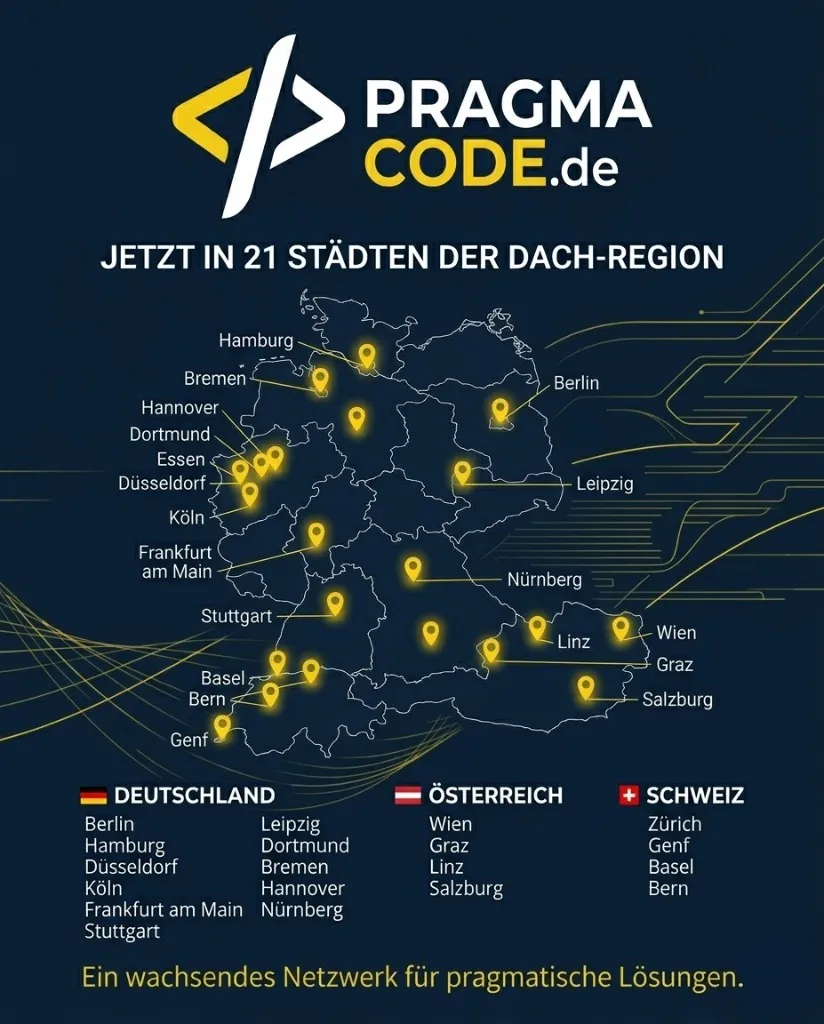
Our Regional Expertise
We are your digital partner – regionally anchored and successfully scaling across borders.
Free your content. Now.
We analyze your static website and develop a tailored migration strategy. No data loss, no ranking loss, 100% more control.
Request Free Migration AuditQuestions about the technology? [email protected]