

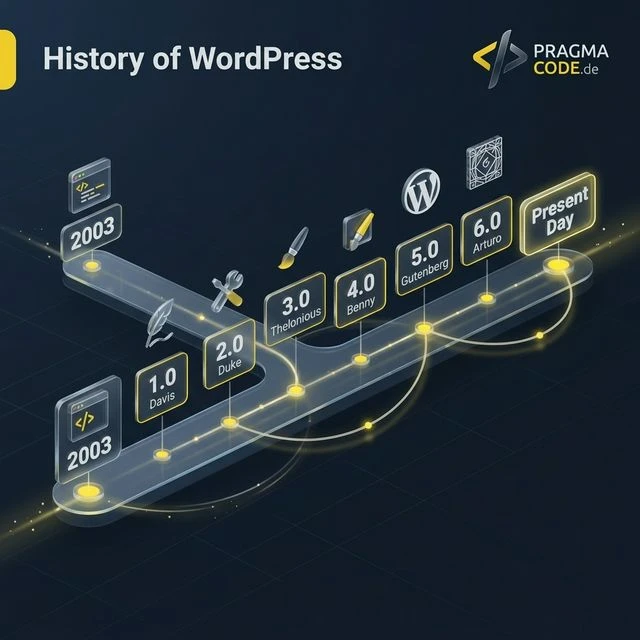
The evolution of WordPress: How a small open-source fork in 2003 became the operating system of the web – and why open data architectures matter more than ever in the 2026 era of generative AI.
This article is an in-depth expert contribution from our content cluster. Discover the complete overview on our main page:WordPress to Next.js Migration →
WordPress in the Age of Answer Engines
Why the open data structure and the “Data Liberation” initiative of WordPress in 2026 are the most important foundation for your GEO (Generative Engine Optimization) strategy and the protection of your content sovereignty.
- Evolution from Blog to CMS: Over more than two decades, WordPress has evolved from a simple weblog tool into the dominant operating system of the web, powering over 43% of all websites today.
- Open Source Success Factor: Thanks to GPL licensing, a massive plugin and theme ecosystem, and the block revolution (Gutenberg), WordPress has remained flexible, extensible, and vendor-neutral.
- Modern Enterprise Option: With the REST API, the Interactivity API, and Headless architectures (e.g. paired with Next.js or Astro), enterprises combine an intuitive editorial experience with uncompromising Core Web Vitals performance.
Introduction: The Operating System of the Web
When we discuss the infrastructure of the modern internet, we often think of undersea fiber optic cables, massive data centers, or global cloud platforms. Yet at the application layer, there is a titan that silently powers almost half of the entire web: WordPress.
With a global market share exceeding 43% of all websites worldwide, WordPress is no longer just a simple blogging tool. It is the de facto operating system of the internet. From local medium-sized enterprises to DAX corporations, global news outlets, and government institutions – they all place their trust in this Open Source ecosystem. But how could a modest project, launched by two passionate developers in their spare time, attain such comprehensive global dominance?
In this guide, we trace the fascinating journey of WordPress. We highlight the technical milestones, the architectural decisions, and the industry challenges that shaped the platform. For you as an IT decision-maker, CTO, and managing director, this history is more than mere nostalgia – it is the key to understanding why open standards consistently outperform proprietary vendor silos over the long term, and why WordPress remains indispensable even in the era of AI answer engines (GEO) and decoupled headless architectures.
Matt Mullenweg and Mike Little fork the abandoned b2/cafelog project and release WordPress 0.7. Strict GPL licensing guarantees permanent freedom from proprietary lock-in.
Version 1.2 (“Mingus”) introduces the plugin architecture. Version 1.5 decouples design from code using themes – sparking a global developer ecosystem.
Version 3.0 transforms WordPress from a weblog tool into a full-scale CMS. The 2011 launch of WooCommerce establishes the platform in enterprise e-commerce.
Version 4.7 integrates the REST API into the core. WordPress becomes a universal data provider for native mobile applications and modern Headless CMS setups.
The block-based Gutenberg editor and Full Site Editing standardize semantic HTML and empower visual site building without code.
WordPress 6.5 to 6.8 delivers native frontend reactivity, structured Block Bindings, optimal LLM crawler indexing, and guaranteed digital sovereignty.
- Introduction: The Operating System of the Web
- Chapter 1: The Fork That Changed Everything (2001-2003)
- Chapter 2: The Rise Through Plugins and Themes (2004-2009)
- Chapter 3: From Blog to CMS (2010-2015)
- Chapter 4: The REST API and Modernization (2015-2017)
- Chapter 5: Gutenberg and the Block Revolution (2018-Present)
- Chapter 6: WordPress in the Enterprise Environment
- Chapter 7: Looking Into the Future – AI and Data Liberation
- Conclusion: Investment Security Through Open Source
Chapter 1: The Fork That Changed Everything (2001-2003)
The End of b2/cafelog
The genesis of the project does not begin under the WordPress brand, but with a software package named b2/cafelog. French programmer Michel Valdrighi developed this PHP/MySQL blogging platform in the early 2000s. One enthusiastic user was an American college student named Matt Mullenweg, who utilized b2 to publish photography from his trip to Washington D.C. Another dedicated participant was Mike Little, an experienced software engineer based in the UK.
In early 2003, Valdrighi suddenly stopped contributing without prior notice. Maintenance of b2 ground to a complete halt, despite unaddressed security vulnerabilities and functional limitations. Mullenweg faced a classic dilemma: He relied on software he loved, but its future was effectively dead. In a legendary blog post in January 2003, he floated the idea of legally forking the codebase under its open-source license. Mike Little responded with the historic comment: “If you're serious about forking b2, I'm interested.”
The Birth of WordPress 0.7
On May 27, 2003, Mullenweg and Little officially released WordPress 0.7. The name “WordPress” was suggested by Matt's friend Christine Tremoulet. While the first release was largely a refined continuation of b2, it introduced vital improvements: a refreshed admin interface, XHTML-compliant templates, and strict adherence to web standards.
However, the single most critical strategic choice was legal: Licensing under the GNU General Public License (GPLv2). This license guaranteed for all time that anyone could inspect, modify, redistribute, and commercially utilize the code, as long as derivative works remained equally free. This clause permanently shielded WordPress from proprietary corporate capture and created the foundation of trust that attracted thousands of developers worldwide.
Tech Fact: The LAMP Stack
From day one, WordPress relied on the LAMP Stack (Linux, Apache, MySQL, PHP). This architectural choice was a masterstroke: While enterprise Java or ASP.NET systems required expensive proprietary servers, PHP ran out of the box on virtually every low-cost shared web hosting tier worldwide. This eradicated technical barriers to entry and ignited exponential global adoption.
Chapter 2: The Rise Through Plugins and Themes (2004-2009)
Perhaps the most consequential architectural leap in the project's early history was the introduction of the hooks and filters system in version 1.2 (code-named “Mingus”, after jazz icon Charles Mingus) in May 2004.
Plugins: The Democratization of Functionality
In earlier content management systems, adding customized functionality required directly modifying core files. The inevitable result was "spaghetti forks" that broke whenever the vendor released an update. With the introduction of the Plugin API, the WordPress development team, led by Ryan Boren, strictly segregated extension code from the core application.
Via standardized entry points (Actions and Filters), third-party developers could hook into the execution lifecycle of any request without altering a single line of core logic. Within months, the largest web extension ecosystem in history was born. Businesses could now install advanced SEO suites, contact form builders, CRM integrations, and spam protection filters (such as Akismet) with a single click.
Themes and the “Kubrick” Look
In February 2005, version 1.5 (“Strayhorn”) introduced the Theme system.
Previously, visual layout and program logic were tightly coupled. By establishing a standardized template hierarchy
(header.php, index.php, single.php, footer.php), presentation was completely
separated from the underlying content database.
The default theme “Default” (widely known as Kubrick, designed by Michael Heilemann) with its iconic blue gradient header defined the visual identity of the web for years. For designers, an entire commercial industry emerged: themes could be designed, purchased, and swapped instantly without risking existing content.
“Code is Poetry.” – This guiding principle in every installation footer became the hallmark of the WordPress community's commitment to writing software that is not merely functional, but elegant, readable, and respectful of open web standards.
Chapter 3: From Blog to CMS (2010-2015)
Throughout its first decade, WordPress fought the perception of being merely a blogging tool. Organizations seeking sophisticated corporate portals, multilingual sites, or complex relational data models routinely turned to systems like TYPO3, Drupal, or Joomla. This dynamic shifted permanently in June 2010 with the release of WordPress 3.0 (“Thelonious”).
Custom Post Types: The Fundamental Game Changer
The introduction of Custom Post Types (CPT) and custom taxonomies was the exact moment WordPress matured into a universal CMS. Prior to 3.0, the internal database recognized only chronological “Posts” and hierarchical “Pages”.
With CPTs, developers gained the ability to define any structured entity: “Products”, “Real Estate Listings”, “Employee Directories”, “Case Studies”, or “Event Calendars”. Combined with custom metadata fields (ACF), full enterprise data models could be modeled natively.
The Business Impact:
Agencies could now deliver complex enterprise applications on top of the robust WordPress engine. The 2011 launch of
WooCommerce (created by WooThemes, acquired by Automattic in 2015) directly capitalized on this architecture:
products, orders, and coupons were all modeled as custom post types. Today, WooCommerce powers more than 25% of all top online shops worldwide.
The Era of Visual Page Builders
As websites grew in complexity, the classic WYSIWYG editor (TinyMCE) proved insufficient for sophisticated layouts. Marketing teams demanded multi-column grids, accordions, dynamic sliders, and high-impact hero banners without waiting on software developers.
The market answered with visual page builders. Solutions like Visual Composer, Divi, and eventually Elementor democratized visual layout construction via real-time drag-and-drop. While this accelerated SME adoption enormously, unmanaged builder usage often introduced technical debt in the form of deep DOM nesting and bloated page payload sizes.
Chapter 4: The REST API and Modernization (2015-2017)
In the mid-2010s, the software engineering industry underwent a massive transition toward JavaScript-heavy frontend architectures such as React, Vue.js, and Angular. Monolithic PHP rendering, requiring full-page browser refreshes on every interaction, began to feel dated compared to responsive Single Page Applications (SPAs).
Opening to the Modular World
The response from the WordPress core team was one of the most ambitious engineering initiatives in its history: Integrating a standardized REST API directly into the core (finalized with WordPress 4.7 in December 2016).
This transformed WordPress from a closed monolith into a flexible, JSON-powered data hub. External applications could now interact with posts, media, users, and custom endpoints using standard HTTP verbs (GET, POST, PUT, DELETE).
Native Mobile Apps
Mobile applications (iOS & Android) pull editorial content, media assets, and user authentication dynamically via the standardized REST API and WPGraphQL.
ERP & CRM Synchronization
Enterprise platforms (SAP, Microsoft Dynamics, HubSpot) synchronize product inventories, stock levels, and customer orders with WooCommerce in real time.
Modern Headless Frontends
Frontend engineers build blazing-fast Next.js, React, or Astro user interfaces while using WordPress as a familiar, decoupled headless backend.
Pro Tip: Headless WordPress Architecture
By decoupling the WordPress backend from a modern Next.js or Astro frontend, enterprises achieve perfect Core Web Vitals scores (100/100 PageSpeed) while eliminating standard plugin security attack vectors on the public web.
Chapter 5: Gutenberg and the Block Revolution (2018-Present)
The Great Paradigm Shift: WordPress 5.0
In December 2018, under the leadership of Matt Mullenweg, WordPress executed the boldest transformation in its history. The classic editor was replaced by a modern, JavaScript-based block editor code-named Gutenberg.
While the transition initially provoked skepticism due to workflow changes and legacy plugin incompatibilities, the strategic necessity was obvious: to remain competitive against modern SaaS site builders (like Webflow or Squarespace), content creation had to shift to modular blocks. In Gutenberg, every element – paragraphs, headings, media galleries, quotes, and widgets – is an isolated block generating clean, semantic HTML5 markup.
Full Site Editing (FSE) & The Interactivity API
With WordPress 5.9 (2022) and subsequent releases, this block paradigm extended to the entire website. Under Full Site Editing (FSE), creators and designers manage headers, footers, navigation menus, and page templates directly within the visual editor without editing PHP files.
Between 2024 and 2026 (WordPress 6.5 to 6.8), this evolution reached enterprise maturity:
Interactivity API
A standardized framework for reactive frontend interactions (instant search, dynamic cart updates, interactive filters) without heavy JS bundles, delivering outstanding Interaction to Next Paint (INP) scores.
Block Bindings API
Connects core Gutenberg blocks directly to custom fields (post meta) and remote APIs without building custom block plugins.
Data Views
Re-architected, high-performance administrative grids and data management interfaces for pages, templates, patterns, and media assets in WordPress Core.
Chapter 6: WordPress in the Enterprise Environment
A persistent misconception claims that WordPress is only suited for simple blogs or small websites. Modern enterprise IT infrastructure proves the exact opposite: Global corporations, high-traffic media publications, and governmental agencies rely on WordPress as the backbone of their digital communications.
Scalability at Enterprise Scale
Global media giants like TechCrunch, Time.com, Disney, and Sony Music manage millions of pageviews per hour on WordPress. Combined with edge caching (Cloudflare, Fastly), Redis object caching, and database read-replicas, the platform scales effortlessly.
Security Through Architecture & WAF
In enterprise production environments, Web Application Firewalls (WAF), least-privilege role management, automated vulnerability scanning, and Two-Factor Authentication (2FA) provide robust resilience. 90% of web security incidents stem from unpatched third-party plugins, not core code.
Unrivaled Ecosystem & Agility
Proven enterprise solutions exist for every business need: WooCommerce for global commerce, enterprise translation workflows for multilingual portals, and managed cloud platforms (e.g. WP Engine, Kinsta) with automated staging pipelines.
The foundation of enterprise success lies in separating staging and read-only production environments. Through modern containerization (Docker/Kubernetes), Infrastructure-as-Code (Terraform), and automated CI/CD deployment pipelines (GitHub Actions), WordPress integrates seamlessly into enterprise IT compliance and governance standards.
Chapter 7: Looking Into the Future – AI and Data Liberation
Artificial Intelligence in Editorial Workflows
WordPress is actively embedding generative AI capabilities directly into the core editorial experience. Tools like the Jetpack AI Assistant assist content teams in drafting copy, generating translations, and creating precise accessibility alt tags. The platform is rapidly advancing toward agentic workflows where AI models generate full landing pages from briefs and manage multivariate A/B testing autonomously.
Generative Engine Optimization (GEO) for Answer Engines
With the ascent of AI answer engines like Google Gemini, Perplexity, and SearchGPT, classic keyword SEO is no longer sufficient. LLM web crawlers prioritize information that is semantically structured, clean, and easily parsed. Because Gutenberg generates clean HTML5 elements and structured JSON-LD schemas, WordPress provides an ideal foundation for being cited as an authoritative source in AI Overviews.
Data Liberation: Reclaiming Digital Sovereignty
In an era where proprietary SaaS platforms increase licensing fees, restrict APIs, and lock business data into proprietary silos, the open-source philosophy of WordPress takes on crucial strategic value. Launched in 2024, the Data Liberation Initiative focuses on making data export, site migration, and asset transfer between web platforms completely seamless.
For mid-market decision-makers, this represents the ultimate insurance policy: 100% permanent sovereignty over your digital content, customer data, and brand identity – completely free of vendor lock-in.
Quick Check: Strategic WordPress Assessment
Conclusion: Investment Security Through Open Source
The WordPress Timeline proves an extraordinary capacity for reinvention. From a modest personal weblog tool, it has evolved into the most dependable digital operating system in the world. For executive leadership and IT directors, this translates into one primary advantage: durable investment security.
Choosing WordPress means building upon a vibrant, globally supported open-source ecosystem. Whether as a classic CMS, an e-commerce storefront, or a modular content engine for headless frontends: WordPress has demonstrated for over twenty years that open standards and community innovation consistently outlast proprietary alternatives.
Ready to modernize your WordPress infrastructure?
Schedule a Free ConsultationOur Regional Expertise
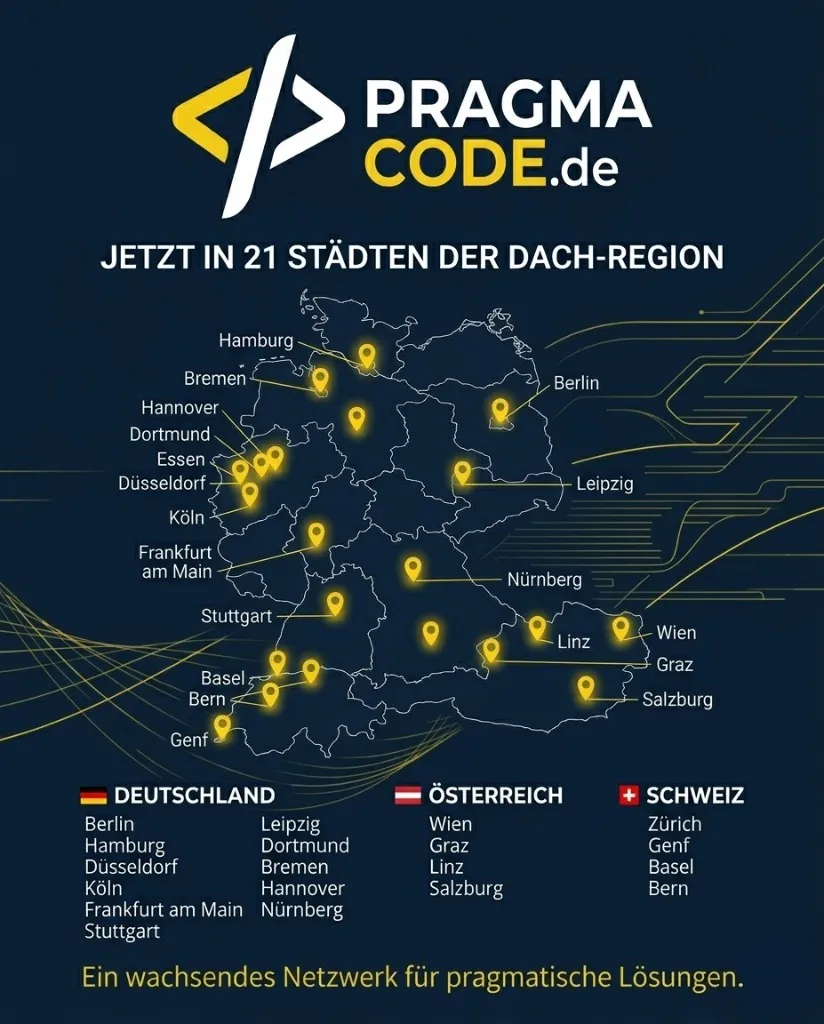
We are your digital partner – regionally anchored and successfully scaling across borders.
Have a vision?
Let's check together how we can make your idea take flight.
Book your free strategy call nowExtended Specialized Glossary
CMS (Content Management System)
Software for collaboratively creating, editing, and organizing content (text, image, video) on websites.
Open Source
Software whose source code is publicly accessible and can be viewed, modified, and used by third parties. Usually free of charge and royalty-free.
Plugin
An add-on module that extends the functionality of WordPress without modifying the core code (e.g., for SEO, security, e-commerce).
Theme
A collection of files that determine the visual appearance (design) of a WordPress website.
Headless CMS
An approach where the CMS (backend) is separated from the frontend (head). Content is sent via an API to any output device (web, app, smartwatch).
Gutenberg
The modern block editor from WordPress, introduced in 2018, which allows the creation of complex layouts without code.
REST API
An interface that allows external applications to communicate and exchange data with WordPress.
LAMP Stack
The technological basis of WordPress: Linux (operating system), Apache (web server), MySQL (database), PHP (programming language).