

Autonomous AI agents and multi-agent systems are transforming software engineering from manual coding to high-leverage orchestration. Discover how engineering teams scale using Cursor, Claude Code, Cline, and MCP, and why automated verification is the key to shipping production-ready software.
This article is an in-depth expert contribution from our content cluster. Discover the complete overview on our main page:AI Automation for Businesses →
- Paradigm Shift to Autonomy: The transition from simple autocomplete copilots to goal-oriented, autonomous multi-agent systems marks the most significant productivity leap in the history of software engineering.
- Three Core Archetypes & MCP: Modern engineering tools are divided into IDE-integrated systems (Cursor, Windsurf), terminal-first command-line agents (Claude Code, Cline), and autonomous cloud engineers (Devin) – standardized and unified via the Model Context Protocol (MCP).
- The Verification Challenge: Because agents scale code volume exponentially, the engineering bottleneck shifts from code writing to verification. Spec-driven engineering, automated test suites, and human-in-the-loop gates are mandatory to prevent severe technical debt and software decay.
The New Era of Software Autonomy
In 2026, software engineers no longer write code line by line in isolation. We orchestrate swarms of agents that independently plan, refactor, test, and ship complete feature branches to production. Companies that master this transformation multiply their development throughput without linear headcount growth.
- 1. Introduction: Moving from Assistance to Autonomy
- 2. Comparison: Copilots vs. Multi-Agent Systems
- 3. The Three Archetypes of Modern AI Coding Assistants
- 4. Architecture: Orchestration in an Agent Swarm
- 5. The Invisible Triad: Context, Tools & Reasoning
- 6. The 4 Architecture Layers in Detail
- 7. Interactive Benchmark: Frontier Models in Coding Tests
- 8. Spec-Driven Engineering vs. “Vibe Coding”
- 9. The “Shipping Gap”: Why More Code Doesn't Equal More Productivity
- 10. Risks & Pitfalls in Enterprise Deployment
- 11. Roadmap: Implementing Coding Agents in Engineering Teams
- 12. Quick-Check Before the Conclusion
- 13. Conclusion & Outlook: The Developer as a System Orchestrator
1. Introduction: Moving from Assistance to Autonomy
Since the breakthrough of generative AI, software engineering has evolved at breakneck speed. Initially, simple autocomplete assistants (such as the first generation of GitHub Copilot) became everyday coding companions. These tools operated essentially like advanced autocorrect: they suggested the next line of code or a standalone helper function based on the immediate context of the active file. They were reactive—waiting for the developer to keystroke before offering suggestions.
In 2026, we have entered a completely new reality: the era of interconnected Multi-Agent Systems. The fundamental difference lies in moving from passive assistance to genuine operational autonomy. Today, developers do not feed an AI short code snippets to finish. Instead, they specify complete functional epics and user stories: “Build a new API integration to synchronize inventory data from our ERP system, connect it via Model Context Protocol, write comprehensive unit and integration tests, and ensure all Core Web Vitals and security gates pass.”
A modern AI Coding Assistant accepts this goal, inspects the entire codebase, drafts a multi-step implementation plan, executes changes synchronously across dozens of source files, executes terminal tests, resolves type errors independently, and ultimately presents a completed, verified pull request to the human engineer. This transition fundamentally shifts the software engineer's role: from writing syntax by hand to architectural design, high-level code review, and swarm orchestration.
Particularly for small and medium-sized enterprises (SMEs), this technology offers a historic opportunity to overcome the persistent shortage of engineering talent. Instead of scaling headcount linearly, existing teams can multiply their leverage through autonomous agents. However, capturing this advantage requires an exact understanding of the underlying architectures, tool categories, and potential failure modes.
2. Comparison: Copilots vs. Multi-Agent Systems
To grasp the significance of this shift, we must compare classic coding assistants (Copilots) directly against modern multi-agent systems. While Copilots remain restricted to the text editor, agents operate as autonomous actors across the entire engineering environment.
Comparison: Classic Copilots vs. Autonomous Multi-Agent Systems
- Interaction Model: Reactive. Waits for developer keystrokes or explicit prompts for short code blocks.
- Context Scope: Local. Primarily analyzes the currently open file and directly adjacent imports.
- Action Radius: Read-Write in editor. Can write and modify code but lacks system-level terminal execution.
- Error Handling: None. If generated code contains syntax or type errors, the developer must fix them manually.
- Goal Orientation: Line and function level. Incapable of long-term planning or multi-file architectural refactoring.
- Interaction Model: Proactive. Receives a global goal, plans sub-steps independently, and executes them in swarms.
- Context Scope: Global & Protocol-Based. Indexes the full repository, reads PRDs, and leverages Model Context Protocol.
- Action Radius: Full system access. Creates files, executes terminal commands, runs sandbox tests, and automates browsers.
- Error Handling: Autonomous loop. Reads compiler and test failures from terminal outputs and corrects its own code.
- Goal Orientation: Feature and ticket level. Implements full refactorings, framework migrations, and production features.
3. The Three Archetypes of Modern AI Coding Assistants
The market for agentic software tools has matured significantly. Today, tools fall into three distinct archetypes, differing in system integration depth, degree of autonomy, and primary operational focus. Engineering leaders and CTOs must understand these distinctions to assemble the right stack for their teams.
IDE-Embedded Agents (e.g., Cursor Composer, Windsurf)
These agents integrate directly into the integrated development environment (IDE) or form AI-native forks of established editors like VS Code. They are optimized for real-time collaboration with the human programmer. Deep editor integration gives them immediate access to active context (open tabs, cursor position, git diffs, terminal diagnostics). They excel at rapid, interactive multi-file edits under direct human supervision, allowing developers to trigger background tasks while continuing to write code in another tab.
Terminal-First & CLI Agents (e.g., Claude Code, Cline)
These tools operate directly inside the command-line interface (CLI) or manage environments through powerful shell integrations. Their focus is maximum freedom of execution within the local development system. Tools like Anthropic's Claude Code use hybrid reasoning models like Claude 3.7 Sonnet to run shell commands, trigger database migrations, spawn Docker containers, and control local test suites. Cline connects MCP servers where every file write and terminal command can be confirmed transparently.
Autonomous Cloud Engineers (e.g., Devin)
The peak of autonomy is represented by cloud-based engineering agents. They execute in an isolated virtual sandbox in the cloud rather than on developer workstations. Connected to GitHub and issue trackers (Jira, Linear), they work autonomously over hours on complex tickets. They possess integrated web browsers to read live documentation, install system packages, and run end-to-end test suites. They function as digital team members that translate requirements directly into production-ready pull requests.
4. Architecture: Orchestration in an Agent Swarm
In enterprise software engineering, individual agents rarely operate in isolation. Instead, they form a coordinated pipeline running from formal requirements through orchestration and implementation to automated verification. The following architecture diagram illustrates this four-tier system:
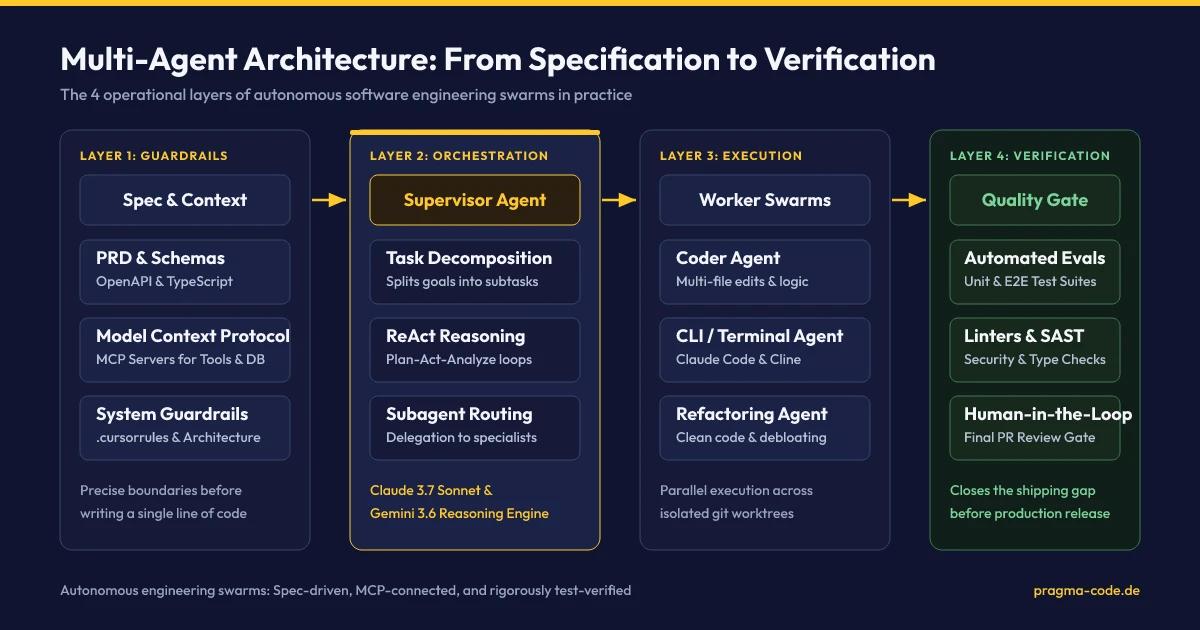
The primary advantage of this architecture is structural decoupling: no agent is permitted to write unvalidated code directly into the main branch. Every step is governed by deterministic guardrails. Only when all automated sandbox tests pass is the pull request submitted to a senior developer for final approval.
5. The Invisible Triad: Context, Tools & Reasoning
How does an autonomous agent modify a complex codebase error-free when human developers often require days to understand unfamiliar legacy systems? The answer lies in the combination of three core pillars known as the agentic triad:
Context Retrieval & MCP
Before writing a single character, the agent indexes the entire repository. Using Abstract Syntax Tree (AST) parsers and vector databases, it builds a semantic model of relationships between classes, interfaces, and database schemas. Through the Model Context Protocol (MCP), it accesses external documentation, internal APIs, and databases via standardized protocols, while configuration files like .cursorrules enforce strict architectural patterns.
Tool-Enabling & Sandboxing
An LLM alone is entirely passive. Only by equipping it with tools does it become an agent. The assistant uses defined functions to read and write files, search directories, execute shell commands (e.g., pnpm test), and launch headless browsers for visual regression testing. Secure execution sandboxes prevent unauthorized system modifications.
Reasoning Loops & ReAct
The operational core is the planning and correction cycle following the ReAct (Reason-Act-Analyze) pattern. The agent plans an action, executes it, analyzes compiler or test outputs in the terminal, and adjusts its plan dynamically. If an approach fails, it rolls back Git state and evaluates an alternative path—mirroring the problem-solving workflow of senior engineers.
A concrete engineering scenario shows this reasoning process during a critical dependency upgrade:
Research & Specification Audit
The agent inspects package.json, audits dependencies, and queries migration documentation via MCP servers or web searches to identify breaking changes in the target release.
Incremental Code Refactoring
It executes the package update command in the terminal and updates all affected call sites across dozens of source files synchronously to match the new API signatures.
Automated Verification & Correction
It launches the test suite. When integration tests fail, it analyzes the terminal stack trace, fixes type mismatches, and re-executes tests until all verification checks pass cleanly.
6. The 4 Architecture Layers in Detail
To safely scale multi-agent systems across an engineering organization, teams need a layered architecture. Each tier provides specific governance, execution, and verification safeguards:
1. Specification & Context Governance
Establishes rigorous Product Requirement Documents (PRDs), OpenAPI specifications, TypeScript contracts, and .cursorrules. This foundation ensures agents never guess intent, but operate on deterministic system requirements.
2. Orchestration & Supervisor Tier
A central supervisor agent (powered by reasoning engines like Claude 3.7 Sonnet or Gemini 3.6 Flash) analyzes complex requirements, decomposes them into modular tasks, and routes them to specialized subagents for coding, refactoring, and testing.
3. Tooling & MCP Integration Layer
Provides agents with secure, standardized access to development tools via the Model Context Protocol (MCP). Enables read/write access to code repositories, terminal sandboxes, documentation servers, and databases under strict access control.
4. Automated Verification & Guardrails
Automated evaluation suites, unit, integration, and end-to-end tests, alongside strict linters and SAST security scans. No code reaches production or human review without passing this automated gate.
7. Interactive Benchmark: Frontier Models in Coding Tests
The efficiency of autonomous software agents depends heavily on the capabilities of underlying frontier models. The recognized industry benchmark SWE-bench (Verified) measures the percentage of real-world GitHub issues models can resolve completely autonomously by generating code and passing test suites. Our interactive widget compares current leading models:
8. Spec-Driven Engineering vs. “Vibe Coding”
Across the software industry, the concept of “vibe coding” has gained viral attention: developers describe broad ideas in natural language, let AI generate code, and quickly test output in a browser. While tempting for weekend prototypes or rapid hackathons, this approach is disastrous for professional engineering teams.
In enterprise settings, unstructured vibe coding creates uncontrollable technical debt, insidious security vulnerabilities, and massive software bloat. When unverified code spreads across hundreds of files, engineering teams lose architectural understanding of their own systems. If a senior developer leaves, nobody can untangle the AI-generated workarounds.
The antidote is Spec-Driven Agentic Engineering (SDAE). Instead of letting agents program blindly, engineers write formal specifications, data schemas, API contracts, and acceptance criteria first. The agent is assigned a bounded problem with deterministic constraints. It may only write code after the specification is approved—and its pull request is only accepted once all automated tests pass. Engineering discipline beats hype.
9. The “Shipping Gap”: Why More Code Doesn't Equal More Productivity
Deploying AI agents immediately yields an obvious metric: the sheer volume of generated code spikes dramatically. Tasks that previously required hours of developer time (such as boilerplate writing, API stubs, and migrations) are completed by agents in minutes.
Yet engineering organizations frequently encounter a paradox known in industry research as the “Shipping Gap”: while teams produce three times as much raw code, the number of features successfully shipped to production stagnates. Why does this happen?
“The primary bottleneck in modern software engineering has moved. It is no longer about writing code, but about verifying and understanding code.”
When an AI generates code across ten files in five minutes, a senior developer may need an hour to comprehend, verify, and approve that code in review. If a team is overwhelmed by AI-generated PRs without automated filtering, overall quality plummets while engineers turn into exhausted code reviewers who lose control of system architecture.
Closing the shipping gap requires automated verification. An organization can only unlock the real leverage of coding agents if it invests equally in automated quality assurance. Agents must be mandated to verify their own changes via unit tests, integration tests, and static analysis linters before any human engineer sees the code. Only green, verified PRs should ever reach review. For agents generating conversational answers rather than code, the same principle applies using evals and measurable acceptance criteria.
Expert Tip: Context Optimization with .cursorrules
The quality of agent output depends directly on provided context. Place a .cursorrules file in your repository root. Specify exact architectural conventions (e.g., “Use Tailwind CSS classes exclusively, enforce TypeScript strict mode, manage application state via Zustand”). This prevents agents from hallucinating outdated framework patterns and saves up to 40% in review time.
10. Risks & Pitfalls in Enterprise Deployment
Uncontrolled adoption of AI coding assistants introduces significant financial, security, code quality, and compliance risks. Companies must actively manage these vulnerabilities.
Security Leaks & Licensing Risks
Agents can inject critical vulnerabilities (such as SQL injections, vulnerable dependencies, or hardcoded secrets) if trained on outdated code. Moreover, copyright or license violations can occur if models replicate GPL-licensed code without proper attribution. Sensitive intellectual property must be protected via zero-data-retention agreements with AI providers.
Code Bloat & Architecture Decay
Because code generation requires zero physical typing effort, agents frequently solve problems by adding redundant code rather than cleanly refactoring existing abstractions. This creates massive, unmaintainable code monoliths. Without strict refactoring mandates, long-term maintenance costs (technical debt) escalate rapidly.
Knowledge Decay & Loss of Control
When developers blindly accept agent suggestions, they lose deep comprehension of system internals. If a senior engineer leaves, remaining team members struggle to debug complex AI-generated code during critical production outages. Institutional software knowledge erodes.
11. Roadmap: Implementing Coding Agents in Engineering Teams
To safely introduce coding agents into an established software team, organizations should adopt a structured four-phase quarterly rollout:
-
Phase 1: Tool Evaluation & Governance (Weeks 1-3)
Select appropriate tools based on enterprise security policies. For sensitive proprietary modules, evaluate on-premise open-source models (such as DeepSeek-R1 or Qwen 2.5 Coder) or enterprise licenses with zero-training privacy guarantees. Configure local
.cursorrulesfiles to enforce architectural standards. -
Phase 2: Establish Test Pipelines & Linters (Weeks 4-6)
Before deploying agents into production workflows, harden your automated test suites. Implement strict automated pre-commit hooks and CI/CD pipelines (e.g., via GitHub Actions). Require agents to verify changes locally through automated tests and linters before opening pull requests.
-
Phase 3: Establish Human-in-the-Loop Reviews (Weeks 7-9)
Institute clear review protocols. Every AI-generated code modification must be vetted and signed off by an experienced senior engineer. Perform regular code audits to detect unnecessary bloat or license compliance issues early.
-
Phase 4: Multi-Agent Orchestration & CI/CD Integration (Weeks 10-12)
Integrate autonomous cloud agents (such as Devin or Claude Code CLI pipelines) into production workflows. Have routine backlog issues (e.g., dependency updates, responsive CSS adjustments) resolved by agents. Human developers transition to product owners who define specs and review verified PRs.
12. Quick-Check Before the Conclusion
Evaluate your engineering organization against this checklist to confirm readiness for autonomous multi-agent systems:
Quick-Check: Multi-Agent Readiness for Engineering Teams
.cursorrules and type systems (TypeScript) enforce code patterns deterministically.
13. Conclusion & Outlook: The Developer as a System Orchestrator
The evolution of AI coding assistants from reactive copilots to autonomous multi-agent systems in 2026 represents a permanent transformation of software engineering. It does not replace human engineers, but it elevates their role: the engineer of the future writes less code manually and instead defines system boundaries, architects reliable schemas, crafts automated verification tests, and orchestrates teams of specialized AI agents.
SMEs that adopt this transformation early and systematically will dramatically increase development velocity, shorten release cycles, and improve team morale by offloading repetitive tasks to machines. Success depends not on hype-driven vibe coding, but on rigorous verification discipline and uncompromising software quality standards.
Ready to Integrate Multi-Agent Systems into Your Engineering Team?
We audit your existing development pipeline, establish robust verification gates, and seamlessly integrate state-of-the-art coding agents like Cursor, Claude Code, and MCP into your workflows.
Schedule Your Free ConsultationOur Regional Expertise
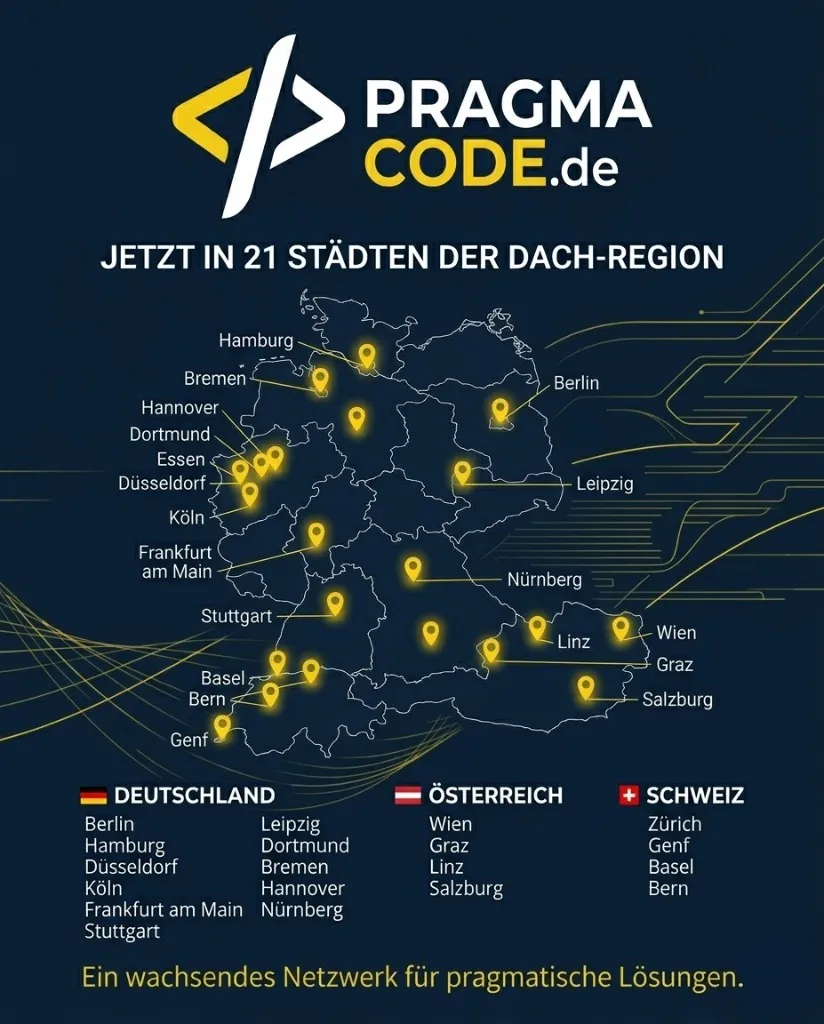
We are your digital partner – regionally anchored and successfully scaling across borders.
Have a vision?
Let's check together how we can make your idea take flight.
Book your free strategy call nowExtended Specialized Glossary
Multi-Agent System
A network of multiple specialized, autonomous AI agents that interact and cooperate through defined interfaces. Each agent has its own tools and roles to independently solve sub-tasks of an overarching goal.
AI Coding Assistant
Software tools that assist developers in programming. Unlike simple autocomplete tools, modern agentic assistants can plan, execute, and test code changes across multiple files, correcting errors independently.
Model Context Protocol (MCP)
An open standard initiated by Anthropic that enables AI models and agents to securely connect to external tools, databases, code repositories, and local development environments via standardized client-server interfaces.
Human-in-the-Loop (HITL)
A control and security principle where a human expert is actively integrated into the decision or approval process of an AI system to ensure quality and prevent AI failures.
SWE-bench
An established industry benchmark evaluating AI models on their ability to independently resolve real-world software engineering issues and pull requests from GitHub repositories.