


A merge request shows which lines changed. An auditor also needs to know which agent called the tool, who approved the change, and which pipeline ran against that commit.
This article is an in-depth expert contribution from our content cluster. Discover the complete overview on our main page: AI Automation & Agents →
GitLab 19.6 and the AI Agents Audit Log
What matters for rollout
- Capture. GitLab 19.6 records calls to its own MCP server. Direct calls to external servers and actions performed by local tools need separate evidence.
- Approval. Tool policy governs the call. Merge and deployment approvals govern successive stages of the protected delivery path.
- Evidence. Use verifiable references to link the call to the merge request, commit, and pipeline. Assign owners to investigate missing records and control access to the evidence.
What GitLab 19.6 adds to the MCP server
GitLab released version 19.6 on November 19, 2026. The release notes describe server-side capture under “Audit events for MCP server tool calls.” A client uses the Model Context Protocol to invoke a tool. The GitLab MCP server records failed attempts and attempts blocked by policy as well as successful calls. The feature documentation describes MCP audit capture as beta under the mcp_session_audit_events flag. GitLab 19.6 Release Notes Audit AI events
When upgrading from GitLab 19.5, inventory the existing Duo reports, MCP server settings, and destinations. Record which additional events you expect in the pilot. That baseline gives the team a way to investigate whether a change came from the new call path, storage, or report permissions. What’s new in GitLab 19.5
The Duo audit report follows a separate release history. It appeared in GitLab 19.1 as a beta with the report flag off, became available by default in 19.2, and gained per-tab permissions in 19.6. GitLab’s AI Gateway generates Duo audit events, which the report presents as session artifacts. For an external client calling the GitLab MCP server, the server-side call is the source of the event. Audit AI events GitLab 19.2 Release Notes
Audit report, storage, and tiers
The release notes list the MCP addition under Free, Premium, and Ultimate and include Dedicated for Government. The feature documentation lists Premium and Ultimate for the AI audit report. Report availability and storage are separate settings, and storage is off by default. The documented view for MCP sessions requires the Owner role on the top-level group. Check the offering, tier, feature flags, storage setting, target namespace, and reviewer permissions against the accounts you will use during the pilot. GitLab 19.6 Release Notes Audit AI events
Export has its own prerequisites. GitLab documents native audit event streaming for Ultimate. A top-level group can configure a group destination, and instance-wide destinations are documented for Self-Managed and Dedicated. Instance streaming has a separate AI switch, which is off by default. It can operate with local storage disabled. Verify that delivery reaches the configured destination and that the payload covers the pilot namespace. Finding a session in the report establishes visibility there. The collector receipt establishes delivery. Audit AI events Group audit streaming Instance AI audit streaming
Agentic security and audit trails in 2026
An agent can read context and propose changes from the same workflow. An agentic audit trail links a tool call to its effect in the repository. Approval determines whether the change enters the protected delivery path. In the illustrative pilot, an agent updates documentation on a working branch and opens a merge request.
Reference architecture for MCP, GitLab CI/CD, and SIEM
Four components from tool call to audit evidence
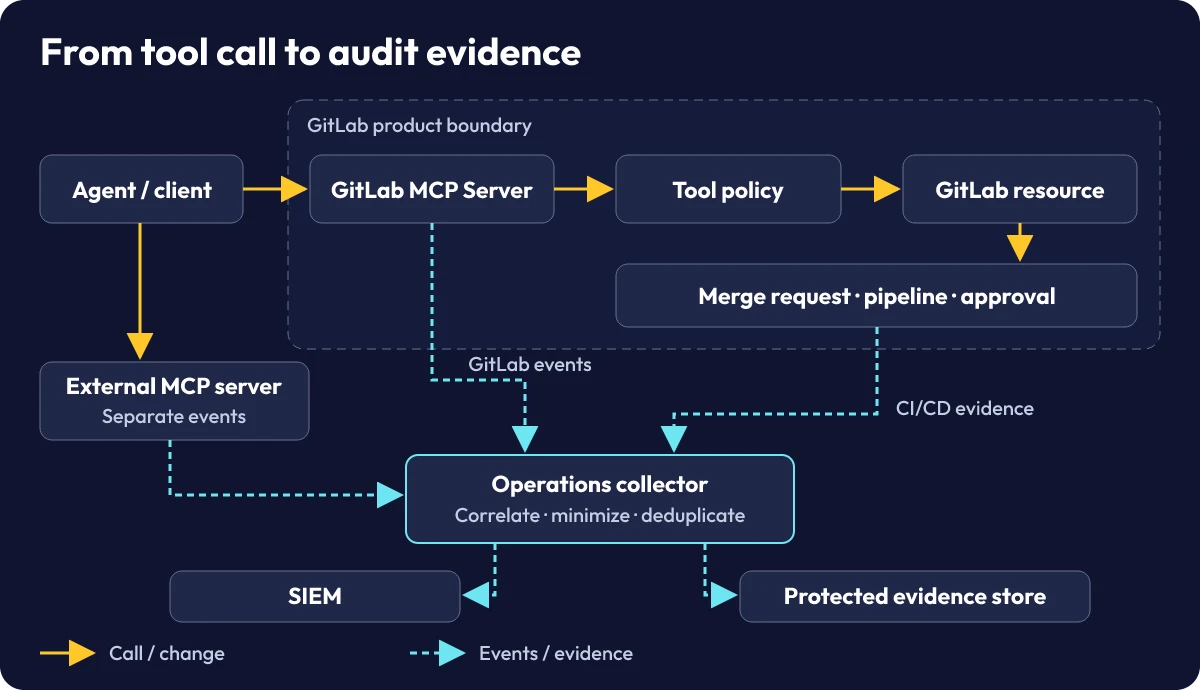
The client sends a tools/call request to the GitLab MCP server. A proposed change must pass both the tool policy and the permissions for the target resource. Across the product boundary, the same client can call an external MCP server directly. The operator of that service provides its own events. GitLab events and CI/CD records meet in an operations collector that prepares searchable data and evidence for protected storage. Tools Authorization
Ingestion and identity
Record the project and authenticated actor. Distinguish user-bound credentials from service identities. GitLab derives agent_name from the declared OAuth application. Use it for attribution and base authorization on the authenticated identity and its permissions. Audit AI events
For multi-agent coding, preserve a verifiable run reference from the orchestrator and the resources touched by each run. Two agents can share one integration and work against the same project. Our guide to MCP servers for enterprise data describes how a custom connector can enforce access and maintain its own audit trail.
Policy enforcement and approvals
GitLab 19.6 enforces Always Deny on the server within the documented group scope. Whether Always Ask prompts a user depends on the third-party client's implementation. Controls for local tools and registered external servers have separate prerequisites. Agent tool governance
Limit write access to the working branch. Configure merge review and deployment approval as separate controls. Check who can push directly, merge changes, and deploy to the protected environment. Protected branches Merge request approval rules Deployment approvals
Audit logging and correlation
Check the tool, outcome, timestamp, and target namespace. ai_tool_invoked and ai_tool_execution_failed can describe the same attempt. GitLab infers MCP sessions to group calls. Use verified identifiers to connect an attempt to the merge request, commit, pipeline, and deployment. Mark unresolved relationships. When Duo and the MCP server capture overlapping activity, via and token_id can help reconcile it. Retain the event sources so a reviewer can inspect the correlation. Audit AI events
SIEM export and protected storage
The collector validates GitLab stream data, normalizes the schema, and deduplicates by source and event ID. Check whether each configured destination receives single events or batches. Use a SIEM index for detection and investigation. Security Information and Event Management Keep the necessary evidence and the provenance of each link in protected storage. Group audit streaming Instance AI audit streaming
Unmanaged agent calls and the GitLab 19.6 audit gateway
Audit gateway here refers to the GitLab MCP server, CI/CD controls, and operations collector working together. GitLab uses AI Gateway for the component that generates Duo audit events. Audit AI events
Unmanaged agent calls
- Identity. The client, runner, and tools expose different actor references.
- Policy. Each integration has permissions that reviewers must establish for the time of the action.
- Evidence. Auditors collect records by call path and reconstruct relationships manually.
Audit gateway in the reference architecture
- Identity. The collector joins verified actor, project, and run references.
- Policy. GitLab MCP rules and CI/CD approvals operate within documented scopes.
- Evidence. Reviewers can find records from GitLab and external sources by provenance and resource reference.
Which calls need their own evidence
A GitLab project can change through several interfaces. Choosing between MCP, REST, and CLI changes the path a reviewer needs to trace. The matrix pairs each path with an expected source and a limit to its coverage.
| Action | Evidence source | Coverage boundary |
|---|---|---|
| GitLab MCP server |
ai_tool_invoked
Also on failure
ai_tool_execution_failed |
Check the target namespace, beta status, storage, and export separately. |
| GitLab Duo | Duo session artifact and associated AI audit events. | Separate capture path. Match overlapping records using documented fields. |
| Direct call to an external MCP server | Event from the external server or a controlled intermediary. | This path sits outside the GitLab MCP server. |
| Local IDE tools | Approved client or runner telemetry, where available. | Filesystem actions are outside the GitLab MCP tool policy. |
| GitLab REST or CLI | Resource history and the applicable GitLab audit event, if available. | Check the event catalog for the action and namespace. |
| CI runner and deployment | Pipeline, job, commit, approval, and deployment status. | Timestamps alone cannot identify the run. |
Audit evidence under the EU AI Act and ISO/IEC 27001
When Article 12 matters for AI agents
Intended purpose and high-risk classification
Start with the system’s intended purpose. Article 6 and Annexes I and III of the EU AI Act establish which systems qualify as high risk and which exceptions to consider. A coding agent that edits internal documentation does not become high risk solely because it acts autonomously or uses MCP. Revisit the classification when the purpose or deployment context changes, and record which system and interfaces the assessment covers. EU AI Act
Article 12 requires high-risk AI systems to support the “automatic recording of events (logs)” over their lifetime. Logging must support traceability appropriate to the intended purpose. Under paragraph 2 it helps identify situations that may present a risk or a substantial modification, supports post-market monitoring, and enables deployers to monitor operation. Paragraph 3 specifies minimum records for the biometric category it identifies. It creates no general obligation to store full prompts or tool payloads for a documentation workflow. EU AI Act
Providers, deployers, and retention
Article 19(1) applies to providers, and Article 26(6) applies to deployers. Each provision addresses automatically generated logs under that party’s control. Retention must be appropriate to the intended purpose and run for at least six months, unless applicable Union or national law provides otherwise. If platform operations only control the GitLab records, document who controls the other sources and who can produce them for review. EU AI Act
Article 113, as amended by the Digital Omnibus, sets December 2, 2027 for the relevant high-risk provisions covering systems classified under Article 6(2) and Annex III. For Article 6(1) and Annex I, the corresponding date is August 2, 2028. For existing systems, check the amended Article 111 and its transitional provisions. Record the relevant date alongside the classification of the system in the risk assessment. Digital Omnibus on AI EU AI Act
Audit trails in the information security management system
Log protection, ownership, and evidence
ISO/IEC 27001:2022 establishes requirements for an information security management system. Map logging and monitoring against the applicable Annex A controls and use ISO/IEC 27002 for implementation guidance. The statement of applicability records which controls the risk assessment calls for and how the organization addresses them. A role matrix identifies who can export events, change rules, review evidence, and delete records after the retention period. ISO/IEC 27001:2022 ISO/IEC 27002:2022
For the pilot, define audit readiness through checks a reviewer can repeat. Compare coverage against the agreed scope and trace a sample, including its approvals, to the source records. Test whether evidence changes are detectable, whether authorized reviewers can restore records during the retention period, and whether deletion works when that period ends. A reviewer repeating the sample later needs the correlation rules and the approval settings in force at the time.
Five steps to an audit-ready AI agent stack
-
Inventory call paths and owners
Fill in the source matrix for a test project. List the reads and writes the agent should perform through the GitLab MCP server. Record whether it edits files locally, whether the runner builds a site preview, and whether a separate MCP server provides context. Assign an owner and identity to each path. The AI control tower guide for multi-agent workflows covers ownership of approvals that span several agents.
Evidence. An approved inventory names the collection purpose, target namespaces, agent identities, evidence sources, and exceptions. For each gap, it identifies who will assess the impact. Update the inventory when the pilot takes on another project or client.
-
Configure permissions and CI/CD approvals
Grant the agent narrowly scoped write access for the documentation change on its working branch. Assign an independent reviewer to the merge request and require a separate approval for the protected test environment. Use the agent's own credentials to check the expected blocks, and use the designated approver's account to confirm that a valid change progresses to the next stage. Protected branches Merge request approval rules Deployment approvals
Evidence. Capture the applicable rules and expected decisions for the test. Show that the documentation workflow succeeds and that an action configured to be blocked is rejected in the test project. Check whether changing the commit after approval requires the merge request to be approved again under the project's configuration.
-
Enable and verify AI audit events
Run an allowed read, a harmless failing call, and a blocked call in the pilot. Check event generation, report visibility for the reviewer, and storage separately. If the target is missing or inaccessible, account for GitLab's documented fallback to the default Duo namespace or the user's personal namespace. Check which permissions apply to records there. Audit AI events
Evidence. Record the event types, target group, actor, and fields actually available for each attempt. Where the failure and invocation can be tied together conclusively, document the references used. Leave the relationship unresolved when a unique key is missing and explain what that means for the audit.
-
Connect SIEM and retention controls
At the HTTP destination, validate GitLab's verification token and the event schema. A repeated delivery should add each record only once to the search index and evidence store. Send minimized fields to the SIEM for analysis and required records to the access-controlled archive. Simulate a collector outage in the test environment. GitLab documents limited batch redelivery and potential event loss while a destination is paused. Group audit streaming Instance AI audit streaming
Evidence. Record what arrived after recovery, what could be reconciled against accessible sources, and which period still lacks evidence. Monitor ingestion against expected activity. Assign responsibility for restoring the export and test access, recovery, and deletion in the archive itself.
-
Reconstruct a merge request run for audit
From tool call to deployment evidence
In the illustrative run, a second reviewer starts with the authenticated actor and the tool event and finds the corresponding merge request. They check the project and merge request reference against the response captured by the client, then use the commit to identify the validation pipeline. If the resulting merge commit differs, they verify its relationship to the tested revision and identify the pipeline that actually triggered deployment. Finally, they confirm the independent merge approval, protected-environment approval, and deployment status.
Evidence. The second reviewer can reproduce the chain with their assigned read permissions and explicitly mark missing links between a call and its effect. If the required evidence chain fails, suspend write actions by the pilot agent. Process pending changes through the approved manual workflow and repeat the reconstruction before restoring agent writes.
Rollout acceptance, FAQs, and sources
Pre-rollout checklist
-
Documentation
Call paths, roles, and owners are documented.
-
Blocks and approvals
Tool blocks and protected approvals were tested with the intended accounts.
-
Traceability
A second reviewer can trace pipeline runs and approvals from the events.
-
Export protection and retention
Export protection, retention, recovery, and deletion have been verified.
Approve the pilot for the documented scope. As the team adds call paths, repeat acceptance for the corresponding controls and evidence sources. Store the approval decision with the evidence, including the roles tested and the manual workflow available during an outage.
Use a complete run as the acceptance sample, with a failed or blocked attempt alongside it. Record which relationships you could verify and which source fields you used to establish each one. That gives the next reviewer a way to reproduce the successful path and the denial, and to see whether the scope has changed since approval.
Frequently asked questions about the GitLab audit log
Which MCP calls does GitLab 19.6 log?
GitLab records tool calls to its own MCP server, including failed and blocked calls. Direct calls to external MCP servers need separate log sources. Verify the target namespace, storage, and export settings for the project where you will run the agent.
Does GitLab enforce approvals in external MCP clients?
GitLab enforces Always Deny on its own MCP server in the supported group scope. Whether Always Ask prompts for confirmation depends on the third-party client's implementation. Configure and verify merge and deployment approvals separately in GitLab.
Agent tool governance · Merge request approval rules · Deployment approvals
Is the GitLab audit log enough for Article 12 and ISO 27001?
The GitLab audit log supplies events for part of the system. The evidence depends on the classification of the overall system, the call paths actually covered, ownership and retention of the logs, and the applicable information security management controls.
EU AI Act · ISO/IEC 27001:2022
Official Sources & Primary Documentation
- GitLab (2026-11-19) GitLab 19.6 Release Notes. Server-side MCP audit events and release scope.
- GitLab (2026-07-16) GitLab 19.2 Release Notes. Audit report availability by default.
- GitLab (2026-10-15) What’s new in GitLab 19.5. Summary of changes in the previous release.
- GitLab (accessed 2026-11-21) Audit AI events. Duo release history, storage, MCP event types, fields, and namespace.
- GitLab (accessed 2026-11-21) Agent tool governance. Scope of server-side denials and support for client confirmation.
- GitLab (accessed 2026-11-21) Group audit streaming. Destinations, verification, batch format, and delivery failure behavior.
- GitLab (accessed 2026-11-21) Instance AI audit streaming. Instance-wide prerequisites and the separate AI streaming setting.
- GitLab (accessed 2026-11-21) Protected branches. Push and merge permissions for protected branches.
- GitLab (accessed 2026-11-21) Merge request approval rules. Requirements for merge request approvals.
- GitLab (accessed 2026-11-21) Deployment approvals. Approvals for protected environments.
- GitLab (accessed 2026-11-21) Audit event types. Event catalog for other GitLab actions.
- Model Context Protocol (2026-07-28) Tools. Tool calls and protocol roles.
- Model Context Protocol (2026-07-28) Authorization. Protocol-level authorization.
- EUR-Lex (2026-07-27) EU AI Act. Consolidated Regulation (EU) 2024/1689, covering classification, logging, and retention.
- EUR-Lex (2026) Digital Omnibus on AI. Regulation (EU) 2026/1744, amending Articles 111 and 113.
- EUR-Lex (2016) GDPR. Article 5(1) on data minimization, storage limitation, integrity, and confidentiality.
- ISO/IEC (2022) ISO/IEC 27001:2022. Requirements for information security management systems.
- ISO/IEC (2022) ISO/IEC 27002:2022. Implementation guidance for information security controls.
- NIST CSRC (accessed 2026-11-21) Security Information and Event Management. Glossary reference for centralized analysis of security events.
AI automation for your business?
I deliver this for small and mid-sized businesses: at a fixed price agreed upfront, working directly with the person who builds it. Process, scope and pricing are on the service page.
See service & pricing Or request a free intro callExtended Specialized Glossary
Model Context Protocol (MCP)
Protocol through which clients discover and invoke capabilities exposed by a server.
Agentic Audit Trail
Linked records that help reviewers reconstruct agent actions and approvals.
EU AI Act
EU regulation that sets obligations for AI systems based in part on intended purpose and risk classification.
Security Information and Event Management (SIEM)
Centralized collection and analysis of security events from multiple sources for detection and investigation.