


Your search clicks have dropped in the middle of a major shopping period. Before commissioning a site-wide rewrite or asking developers to change every product template, identify the queries and pages behind the drop. That gives marketing, editorial and engineering teams a specific problem to investigate.
This article is an in-depth expert contribution from our content cluster. Discover the complete overview on our main page: SEO & Content →
Our technical SEO audit guide covers a routine review of your website. This article starts with a specific event. If search visibility changed around a confirmed rollout, the immediate job is to establish a fair comparison and decide which pages warrant investigation. Use E-E-A-T in the AI era to take the content assessment further. Our articles on zero-click searches and AI Overviews and generative engine optimization explain why a page can be visible in search while drawing fewer clicks.
- Save your baseline. Keep the pre-rollout data and record your promotions and site changes.
- Locate the loss. Identify the page types and search queries that moved together.
- Fix what you can verify. Address confirmed technical faults and prioritize content where you can identify a specific gap.
What happened in the Google November 2026 core update
Google began rolling out the update on November 10, 2026, and marked it complete on November 24, 2026. The dashboard uses US Pacific time. The rollout applied globally and across all languages. Google’s ranking history lists the duration as 13 days and 20 hours. Google Search Status Dashboard for the November update · Google’s ranking history
Google describes core updates as broad changes to its search systems intended to keep results helpful and reliable. Its November notice names no affected industries or page types. The ranking history also lists core updates in March and May and spam updates in March, June, August and September of the same year. If your decline began earlier, put the turning points in your own report alongside those separate events before drawing a conclusion. Google’s core update documentation · November notice · Google’s ranking history
What the early visibility data shows in Germany
Rheinwunder analyzed the SISTRIX Visibility Index for a sample of large domains in Germany. Its interim findings dated November 18, 2026, showed gains for vergleich.org, a product comparison site, and losses for gutefrage.net, a community question-and-answer site. For the price comparison site billiger.de, the larger share of the measured decline occurred before the official rollout. The index measures a site’s presence across a selected keyword set. Use your own reporting for traffic, enquiries and orders. Rheinwunder’s analysis and methodology
A swing at domain level can come from a single directory even when product or service pages hold steady. Decide which page groups matter to your business before you open the comparison. An online retailer might look at evergreen categories, while a distributor might focus on the product ranges that bring in quote requests. The earliest a fuller assessment of your own site can begin is early December, once the complete post-rollout week is available. Search Engine Journal on the first complete week
December 2026 core update: What Google preannounced
Google preannounced the update on November 24, 2026. It says the changes will improve how its systems understand and rank relevant content, including for longer and more complex questions. Google also intends to improve personalized results for people who have personalization switched on. The rollout is planned for December 2026 and covers every location and language where Google Search is available. The dashboard gives no specific start date as of this writing. Google Search Status Dashboard for the December preannouncement
Google has published a separate page about when it gives advance notice. Its examples include policy changes that may require site owners to act and broad changes that may noticeably affect rankings across many queries or sites. Google publishes preannouncements and confirmed start and completion notices on the Search Status Dashboard. For your measurement calendar, the confirmed start is the next milestone to record. Google Search Central on advance notice
What that focus could mean for your pages
Our interpretation starts with the questions customers already ask your sales team. A procurement manager who needs to know whether a spare part fits an existing machine and can arrive before a scheduled shutdown needs more than a specification sheet. Put compatibility details on the product page. Explain what determines delivery and give buyers a way to confirm a special configuration. That helps with the real decision even when the query recorded in the report contains only part of the question.
Personalization has a practical implication for measurement. A search you run yourself shows what one searcher sees in that moment. Use it to inspect how a result appears, then keep the same property, search type and segments across your reporting windows. The Search Console documentation explains how results can vary with time, location, device and recent search history.
Core update recovery starts with Search Console analysis
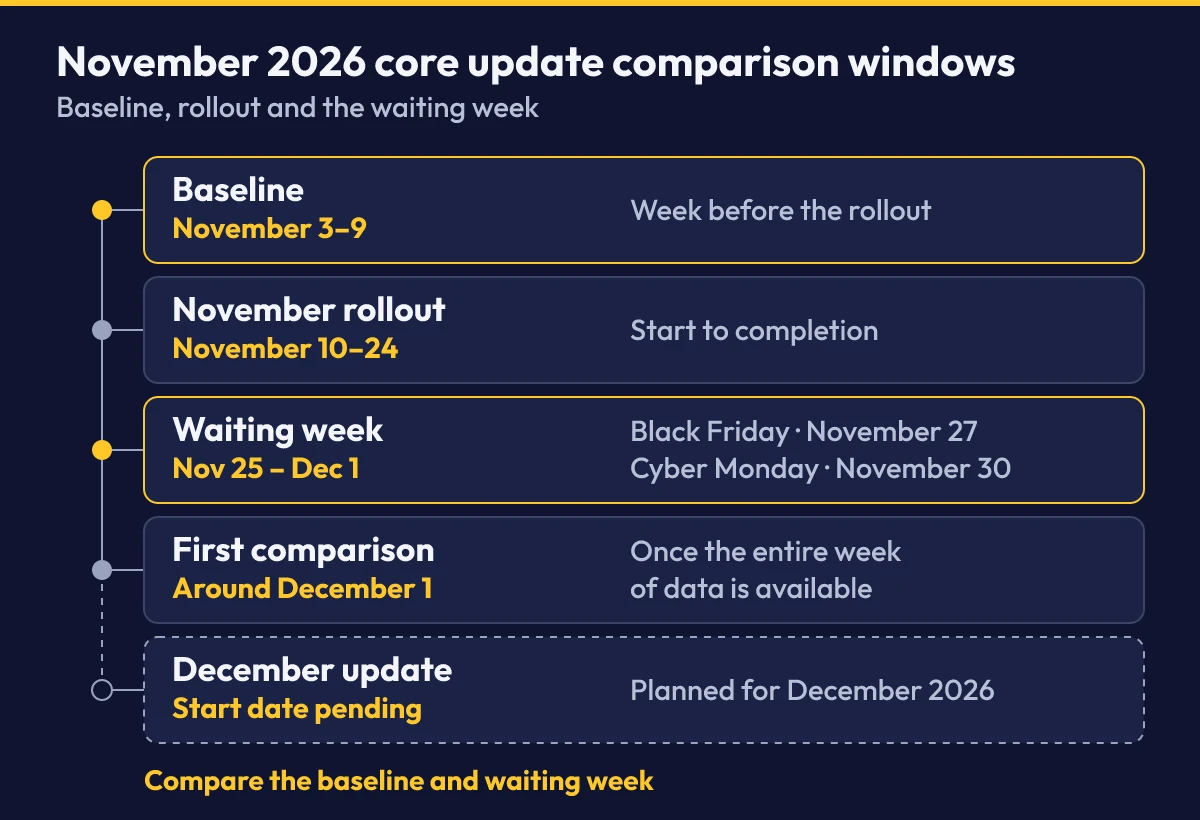
Open the search results Performance report in Google Search Console. Google recommends waiting at least a full week after a core update finishes and then comparing a week after the rollout with a week before it began. For November, use November 3–9, 2026, as an example of a pre-rollout baseline and November 25–December 1, 2026, as the first complete week after the rollout. That puts the earliest comparison around December 1, once the data through that day is complete. Keep the rollout dates out of the comparison windows and retain them on the daily chart for context. Google’s guidance on when to review the data · Search Engine Journal on the November comparison dates
Account for Black Friday and Cyber Monday
Black Friday on November 27 and Cyber Monday on November 30, 2026, both fall inside the post-rollout window. Search Engine Journal flags the overlap. A German retailer can see the same problem as a merchant in another participating market: demand shifts to deals and dedicated campaign pages. A B2B company may instead see a change around a year-end purchasing cycle or its own promotion. Mark when your offers ran. Add a year-over-year comparison aligned to the shopping events and, for B2B campaigns, check comparable working days and campaign stages. Search Engine Journal on the overlap · Google on diagnosing seasonality
Illustrative example for an online retailer
A deals page picks up clicks during a promotion while an evergreen category loses them. At site level those changes partly cancel out. Filter for the category page and see whether the missing clicks came mainly from discount-related queries or whether customers are also finding it less often for ordinary product searches. Those findings point to different next steps.
Connect pages, queries and metrics
Use the date filter at the top of the Performance report, open the comparison tab and set the date ranges. Start with text-based Web Search. Google recommends analyzing other search types, such as images, video or news, separately. Open the Pages tab and identify a URL with a notable change. Add a page filter for that URL, then switch to Queries to see which searches changed for that URL. On a site serving multiple markets, repeat the process using a country filter. Site-wide totals can obscure a loss in a single country. Search Console Performance report documentation · Google on filtering and comparing · Google on using the report tabs · Google on analyzing search types
Rankings and impressions decline together
Check whether the same queries and URLs show the loss across the comparison. See whether the change is confined to a product family or also appears across page templates and unrelated topics.
Impressions fall while position holds steady
Check whether demand for the affected terms changed in that market. Google's guide to traffic drops describes how to compare the affected queries in Google Trends.
Clicks fall on similar impressions
Review the click-through rate for affected queries. Sample the search results to see whether your title and description convey the information customers are looking for and what else competes for their attention.
A different URL gains visibility
Look at which pages are associated with the query. A change might fit an intended redirect. If visibility moves between similar pages, check their purpose and which URL is linked internally as the main one.
Average position in the chart refers to the top result from your site. In the table it refers to the URL or group shown in the row. If the query mix changes, the average can move even when a group of important queries holds steady. For a suspected ranking loss, compare the same queries and hold country and device constant wherever they matter to the finding. When investigating zero-click search, look at both impressions and clicks. Falling click-through rate alone cannot identify a change in a specific feature, such as AI Overviews. Google documents how traffic from its AI search features contributes to the Performance report. Google on performance metrics · Google on AI features in Search
Check for technical faults, seasonality and spam updates
Put the trend for affected URLs alongside your release log. If the loss is concentrated on a template your team just changed, inspect affected pages against stable URLs from the same section. An unexpected noindex directive or a redirect to the wrong page gives you a specific issue to verify. If search demand looks seasonal, use the comparable promotional days as a separate benchmark and see whether the mix between promotional and evergreen pages shifted similarly last year. Google on technical causes and seasonality · Search Console URL Inspection documentation
If the loss began before the November rollout, review the ranking history and the Manual actions report. Google lists spam updates separately in the ranking history. The Search Console report shows manual actions taken against your site. Automated spam detection and manual actions are different processes. Record which dates actually overlap, then document any policy violation or site fault that you can establish independently. Google’s ranking history · Google’s spam policies · Google’s Manual actions report documentation
A focused site audit and SEO audit after the update
Use the diagnosis to select a sample for your audit. Include URLs that lost visibility alongside stable pages built with the same template. If the drop is concentrated on filtered category pages, an affected filter URL and its healthy parent category tell you more than an inspection of the home page. Record what happened and what you expect each sample URL to do. For a fuller technical review, follow the SEO audit guide and checklist. Our website audit page describes the broader deliverables of a website review.
Availability and indexing
Check the HTTP response and any redirect. Then use URL Inspection to compare information about the indexed version with a live test. If the two differ, record when the site changed and which version the report is describing.
Canonical URL and internal links
Check whether the canonical tag, sitemap and internal links point to the intended primary URL. For variants or categories that have moved, compare it with the Google-selected canonical in the indexed data from URL Inspection.
Content and search intent
Pick a query from your analysis. Open the page on a mobile device and try to finish the task behind the query. If a buyer needs a product for a particular use, can they see how to choose, check relevant operating limits and reach the right product?
Expertise and evidence
Check who stands behind important claims and how readers can verify them. A dated specification, a clearly described testing method or an identifiable subject specialist may help. Google explains E-E-A-T in its guide to helpful content.
Evidence and acceptance criteria
For each finding, record the URL, the evidence and who will verify the fix. For an incorrect canonical, the immediate test is whether the template outputs the intended URL. Keep subsequent ranking performance as a separate observation.
The audit should give your team a clear decision to make. An inaccessible category may need a template fix, while a working page with unclear selection guidance may need editorial work. Ask sales which details customers routinely request by email before placing an order or soliciting a quote. If that information matches the queries where the page lost visibility and the page’s purpose, give the editor a precise brief. Start with pages important to your business where you can point to a specific improvement.
What to do before the December rollout
Google advises against drastic measures for small ranking changes. For a sustained, substantial loss, it recommends assessing both the most affected pages and the site as a whole for helpful, reliable content. Fix a broken product page as soon as you can verify the problem. Log the date and template involved, and avoid simultaneous changes to pages you are still using to establish your baseline. Google’s core update guidance
-
Record the baseline
Save the pre-rollout period and the filters used. Record the rollout, campaigns and site releases so you can repeat the comparison under the same conditions.
-
Fix verified problems
Correct reproducible faults on affected pages and test the fix on the relevant template. Approve content changes in response to a specific problem customers face.
-
Schedule the next review
Record the confirmed December start once it appears in the dashboard. Keep your November findings and filters on file to distinguish seasonal changes from data collected after the next rollout.
Management needs a short finding that points to the evidence. A redistribution of clicks across promotional pages calls for a different response from a persistent decline for a key category’s regular search terms. Stating the finding plainly helps the team avoid blanket rewrites and agree on what it will measure next. Google says the time it takes for improvements to show up in Search varies with what changed and when its systems reassess the site or page. Google on how long changes take to show in Search
Sources and official documentation
As of 28 November 2026
- Google Search Status Dashboard for November · Rollout start, completion and global scope.
- Google Search Status Dashboard for December · Planned month and announced focus.
- Google's ranking history · Duration and earlier core and spam updates.
- Google Search Central on core updates · Waiting period, comparison and responses to ranking drops.
- Google Search Central on advance notice · What Google announces and where to track rollouts.
- Search Console Help for the Performance report, common tasks, filtering and comparisons, URL Inspection and manual actions.
- Google Search Central on diagnosing traffic drops, helpful content, spam policies and AI features in Search.
- Rheinwunder on the visibility of sampled domains in Germany · SISTRIX data collected during the rollout.
- Search Engine Journal on the November rollout completion · Comparison windows and the holiday shopping overlap.
Frequently asked questions about assessing a core update
When can I compare the November data?
Once a full week of post-rollout data is complete. Compare that week with a week before the rollout. If your site is seasonal, add a separate comparison aligned to promotional days. Google on comparison windows
Where should I start if individual pages show a sharp drop?
Filter the Performance report to an affected URL and check its queries. Then review the indexing status and compare the URL with a stable page that uses the same template. Google on filters · Google on URL Inspection
Has Google announced a start date for the December update?
Google names December 2026 as the planned month. As of this review, the dashboard contains no specific start date. Google's preannouncement
Have questions about your findings?
Get in touchSEO & content for your business?
I deliver this for small and mid-sized businesses: at a fixed price agreed upfront, working directly with the person who builds it. Process, scope and pricing are on the service page.
See service & pricing Or request a free intro callExtended Specialized Glossary
What is a core update?
A core update is a broad change to Google's search systems. Google explains its purpose and scope in its core update documentation.
What is Google Search Console?
Search Console shows site owners which queries their pages appeared for and which pages received clicks, among other data. The Performance report documentation explains the available metrics.
What is a canonical tag?
A canonical tag points to the preferred URL for duplicate or very similar content. In the URL Inspection tool, you can compare your declared canonical with the canonical Google selected when both values are available.
What does E-E-A-T stand for?
It stands for experience, expertise, authoritativeness and trustworthiness. Google explains these qualities in its guide to creating helpful, reliable content.