

A quiet revolution is reaching the most important communication channel in Europe: Meta has begun activating native AI agents directly inside WhatsApp Business. Small and medium-sized enterprises (SMEs) can now enable an intelligent AI assistant in a matter of minutes without complex coding. This assistant answers customer inquiries 24/7, recommends bestsellers, and coordinates appointments. But where are the limits of this out-of-the-box solution, and when is it time to upgrade to the WhatsApp Business API?
This article is an in-depth expert contribution from our content cluster. Discover the complete overview on our main page: AI Automation for Businesses →
- Autonomous Interaction: The native Meta Business Agent answers FAQs, recommends catalog items, and qualifies inbound leads directly in the chat using Meta's Llama models.
- WhatsApp Flows & Commerce: Modern conversational agents in 2026 go far beyond basic text, driving interactive full-screen forms, native appointment scheduling, and streamlined checkout without channel breaks.
- Scaling Limits: For deep ERP/CRM integrations, strict GDPR compliance (zero model training), and reliable multi-agent workflows, the WhatsApp Business Platform (API) remains essential.
- 1. Introduction: WhatsApp as the New Hub for AI Agents
- 2. What is the Meta Business Agent?
- 3. Core Features & WhatsApp Flows in Detail
- 4. The 4-Pillar Architecture for Enterprise WhatsApp
- 5. Step-by-Step Setup in the App
- 6. Operational Cost Traps and Scaling Bottlenecks
- 7. Native App vs. WhatsApp Business Platform API
- 8. Data Privacy, EU AI Act 2026, and Compliance
- 9. Conclusion and Strategic Outlook
The Shift to Conversational AI
Activating the Meta Business Agent directly in WhatsApp marks the final transition from rigid, keyword-based FAQ bots to context-aware, autonomous AI agents. In the era of GEO (Generative Engine Optimization) and Conversational Commerce, instant messaging has evolved into the primary customer touchpoint for European SMEs.
1. Introduction: WhatsApp as the New Hub for AI Agents
In both B2C and B2B markets, today's customers demand immediate, accurate, and highly personalized answers – delivered directly on the messaging platforms they use constantly throughout their everyday lives. In Europe, WhatsApp is the undisputed market leader in daily communication, maintaining an active smartphone penetration rate above 93%. However, while enterprise conglomerates have spent substantial seven-figure budgets building bespoke chatbot ecosystems, small and medium-sized enterprises (SMEs) were frequently left on the sidelines. Answering repetitive customer inquiries, scheduling consultation calls, and drafting preliminary quotes binds hours of valuable specialist time every single day.
With the global rollout of the native Meta Business Agent directly inside the standard WhatsApp Business app, Meta is fundamentally democratizing access to conversational AI. Local service providers, boutique agencies, e-commerce retailers, and specialized consultants can now launch a capable AI assistant on their mobile device within minutes. The agent acts like an autonomous digital employee in 1st-level support: reading customer free text, querying the company's business profile and catalog, and formulating accurate, courteous responses in seconds.
Furthermore, modern Click-to-WhatsApp Ads on Instagram and Facebook connect paid advertising campaigns directly with interactive messenger chats. Potential buyers clicking on a promotional banner are routed instantly into a chat where the AI agent qualifies their intent, presents tailored offers, and schedules calls without any disruptive website redirects. Yet this technological leap also introduces strategic considerations: where does the free mobile app reach its architectural limits? How can companies comply with EU AI Act Article 50 transparency rules? And at what transaction volume does migrating to the enterprise-grade WhatsApp Business Platform become mandatory?
2. What is the Meta Business Agent?
The Meta Business Agent is a native AI solution embedded directly into the WhatsApp Business mobile application, powered by Meta's proprietary Llama large language model suite. Unlike legacy chatbots that relied on static keyword triggers and brittle branching logic, the business agent leverages advanced generative natural language processing (Generative AI). As a result, it accurately discerns user intent even when customers use colloquial phrasing, dialects, minor typos, or multi-part complex questions.
The system is engineered to provide substantial relief across three essential operational pillars:
Instant Response Readiness
The agent responds within two seconds – 24 hours a day, 365 days a year. This eliminates frustrating wait times and prevents prospective buyers from bouncing to competitor solutions.
Automated Lead Qualification
It methodically collects crucial project details, including company name, team size, email address, and specific business needs, pre-qualifying leads for your sales team.
Product Consultation & Catalog Sync
By synchronizing directly with your WhatsApp catalog, the agent recommends matching products and shares rich interactive product cards complete with direct purchasing buttons.
The core benefit of the native mobile integration is its virtually nonexistent barrier to entry. No software developers, external servers, or monthly API software licenses are required. The agent reads data already stored in the mobile app and can be fully activated in under ten minutes. However, all interaction data remains sequestered within Meta's proprietary ecosystem, and native interfaces to ERP systems or centralized CRM platforms are entirely absent from the standalone mobile app.
3. Core Features & WhatsApp Flows in Detail
To maximize the commercial benefits of the Meta Business Agent, businesses must understand its underlying capability modules. The platform blends semantic knowledge retrieval with interactive rich messaging components.
Knowledge Base & Training
The baseline knowledge stems from your business profile (business hours, location address, service portfolio) and linked corporate websites. When enabled, the AI also analyzes historical conversations from preceding months to mirror your brand voice and master recurring questions.
Bestseller Recommendations & Catalog Sync
The agent reads the WhatsApp catalog in real time. For product inquiries, it generates both helpful explanatory copy and dynamic product carousels, empowering customers to configure options and begin checkouts immediately.
Appointment Coordination & WhatsApp Flows
Leveraging native WhatsApp Flows, the chat opens interactive full-screen forms directly inside the app: customers select appointment slots, choose services, or pick account managers without leaving the messenger.
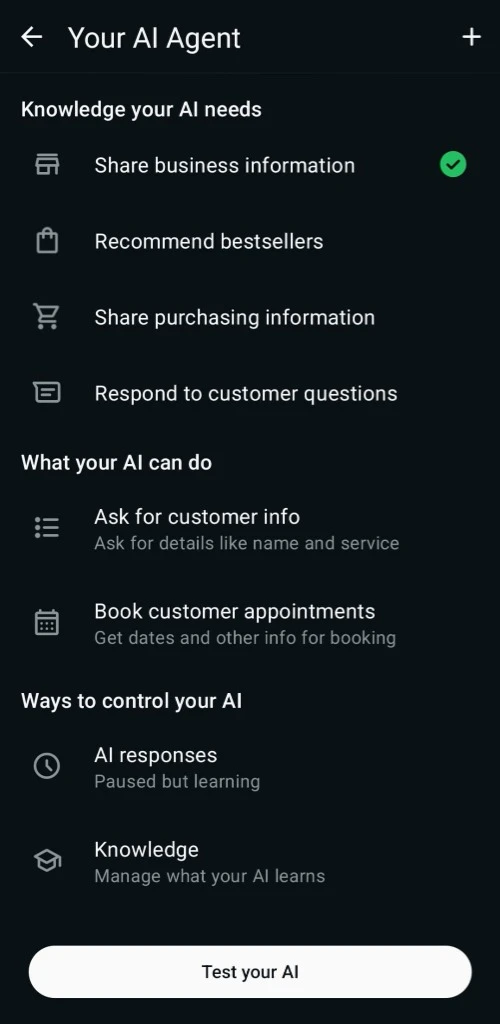
For business owners and support staff, the app provides a hybrid operational model. Under 'AI responses', you can toggle the operating state. The 'Paused but learning' mode allows the AI to process live chats in the background and suggest draft replies internally without sending them to clients. This offers an ideal, risk-free validation phase prior to public launch.
Important Note on the Management Interface:
The following screenshot displays the configuration dashboard of the Meta AI agent within the WhatsApp Business mobile settings. Visible sections highlight knowledge assignment, capability toggles (Ask for customer info / Book appointments), and operational status controls (AI responses / Knowledge).
An indispensable safety mechanism is the Human Handoff. If a customer displays frustration, explicitly requests a human advisor, or if the AI calculates low confidence for an inquiry, the bot pauses immediately. The business receives an instant push notification and support agents can take over the conversation seamlessly in the active chat thread without interrupting the user experience.
4. The 4-Pillar Architecture for Enterprise WhatsApp
While the native mobile app satisfies the needs of solo entrepreneurs and micro-businesses, growing mid-market enterprises require a resilient enterprise architecture. Companies handling hundreds of daily conversations, pulling real-time ERP information, or orchestrating multi-tier sales pipelines depend on a service-oriented architecture powered by the official WhatsApp Business Platform API.
1. Meta Cloud API & Webhooks
Centralized session management via certified Business Solution Providers (BSPs). Inbound WhatsApp messages are transmitted via encrypted HTTPS webhooks to the company's dedicated middleware stack.
2. Agent Engine & Intent Router
Intelligent routing layer (built on n8n or LangGraph). Categorizes customer requests in milliseconds and autonomously decides between FAQ responses, interactive WhatsApp Flow triggers, or human escalation.
3. Enterprise RAG & ERP Connectors
Secure integration via Retrieval-Augmented Generation (RAG) with internal ERP systems (SAP, weclapp, Xentral) and CRMs (HubSpot, Salesforce). Fetches live delivery statuses, product stock levels, and invoices in real time.
4. Human-in-the-Loop & Shared Inbox
Frictionless escalation to human support agents across modern multi-agent shared inboxes. For complex disputes or high-ticket sales negotiations, specialists intervene with complete conversation context.
By decoupling the messaging channel from backend business logic, the WhatsApp agent connects seamlessly with broader enterprise automation pipelines. For example, if a client inquires about an equipment shipment, the orchestration layer queries the ERP system via RAG, authenticates the account number, retrieves live tracking from the carrier's API, and formulates a polite status update automatically.
5. Step-by-Step Setup in the App
For smaller businesses, enabling the native Meta Business Agent on mobile is refreshingly uncomplicated. Follow this three-step pipeline to launch your system:
Open the WhatsApp Business app on your mobile device. Navigate to Tools and choose the Meta Business Agent option. Accept the terms of service and authenticate biometrically (via FaceID or fingerprint recognition).
Configure your core information sources. Ensure your business profile is comprehensive and accurate. Turn on the 'Learn from past chats' toggle to permit the AI to study historical inquiries, and sync your digital catalog.
Tap the 'Test your AI' button at the bottom of your screen. Simulate diverse customer inquiries across various scenarios. Once responses meet your standards, switch the status under 'AI responses' from 'Paused' to 'Active'.
Expert Tip: Clean Source Data Yields Superior Training
The generative accuracy of any AI model depends directly on the quality of its inputs. Prior to enabling the assistant, verify that opening hours, pricing schedules, and catalog items are up to date. Inaccurate or obsolete source data will directly cause the AI to communicate false information to prospective clients.
6. Operational Cost Traps and Scaling Bottlenecks
When implementing conversational messaging solutions, organizations frequently encounter practical pitfalls that erode margins and compromise user trust if left unaddressed in system design:
24-Hour Service Window Timeouts
If an agent responds late or fails to resolve inquiries within Meta's 24-hour service window, any subsequent follow-up requires paid template messages, dramatically increasing conversation costs.
Hallucinated Commercial Commitments
Without strict RAG guardrails, generative models can fabricate unauthorized discounts or outdated quotes, resulting in financial liability and customer disputes.
GDPR Fines from Unmasked PII
Transmitting unredacted customer data (bank account numbers, phone numbers, addresses) to third-party language models creates serious non-compliance under GDPR and EU AI Act standards.
7. Native App vs. WhatsApp Business Platform API
For independent professionals, solo tradespeople, and boutique stores with modest inbound volumes, the native app provides an unbeatable cost-free starting point. However, once a company employs multiple support agents, operates enterprise CRMs, or enforces formal Service Level Agreements (SLAs), adopting the WhatsApp Business API becomes essential.
Comparison: Native WhatsApp Business App vs. WhatsApp Business API
- Cost Factor: 100% free directly inside the native mobile Meta app.
- Setup Speed: Ready in minutes without requiring technical developers.
- Knowledge Base: Restricted to mobile profile, app catalog, and device chat history.
- CRM Integration: No interfaces to external ERPs, ticketing tools, or CRMs.
- GDPR Compliance: Questionable, as Meta's default terms utilize chat data for AI training.
- Multi-User Scaling: Severely constrained by mobile hardware link limitations.
- Cost Factor: Billed by conversation category plus solution provider fees.
- Setup Speed: Enterprise deployment via experienced integration specialists.
- Knowledge Base: Unlimited retrieval across internal ERPs, databases, and vector stores.
- CRM Integration: Full two-way synchronization with HubSpot, Salesforce, and n8n.
- GDPR Compliance: 100% compliant through EU infrastructure and formal training opt-outs.
- Multi-User Scaling: Unlimited simultaneous agents via modern shared inbox software.
The decisive differentiator is governance: in the mobile app, the AI operates as an opaque Meta black box. With the API, enterprises maintain sovereign control over prompts, data flows, validation guardrails, and model selection (such as European-hosted Mistral models or self-hosted open-source weights in local data centers).
8. Data Privacy, EU AI Act 2026, and Compliance
Commercial customer communication in the European Union is governed by strict regulatory frameworks. Following the enforcement of the EU AI Act alongside existing GDPR mandates, companies deploying AI chat agents must adhere to three foundational compliance criteria:
1. Transparency Disclosure under EU AI Act (Article 50)
Businesses must clearly and proactively inform users that they are interacting with an artificial intelligence system. This notification must occur before or immediately upon the assistant's initial response.
2. Data Processing Agreements (DPA) & Zero-Retention
Compliant deployment across European jurisdictions requires executing a binding DPA with the Business Solution Provider (BSP) that contractually prohibits using client messages for model training.
3. Automated PII Redaction (Privacy Filtering)
Sensitive Personally Identifiable Information (such as banking data or national ID numbers) must be sanitized and masked server-side before prompt payloads are dispatched to inference models.
Zero Model Training
Customer communications routed through the enterprise API are contractually shielded from foundational model training.
End-to-End Encryption & EU Localization
Message payloads are encrypted in transit via TLS 1.3 and processed strictly within certified European cloud nodes.
Automated Retention Schedules
Organizations set customized data retention and automatic purge cycles in alignment with internal compliance policies.
While the native consumer app resides in legal ambiguity under Meta's consumer terms, the enterprise WhatsApp Business Platform coupled with European providers offers a fully auditable, defensible setup.
9. Conclusion and Strategic Outlook
The arrival of the Meta Business Agent inside WhatsApp marks a defining moment for customer experience: conversational AI has formally entered mainstream European business operations. For micro-businesses, it provides a powerful, zero-cost mechanism to deliver 24/7 responsiveness.
Yet for ambitious mid-market enterprises, the standalone mobile assistant is primarily an instructive proof-of-concept. Realizing sustainable competitive advantages, deploying WhatsApp Flows, synchronizing live ERP/CRM data, and ensuring sovereign data governance requires the WhatsApp Business Platform. The future of customer service is autonomous, conversational, and integrated.
Quick-Check: Your Roadmap to WhatsApp Sovereignty
Do you have questions about WhatsApp integration and AI automation?
Schedule a Free ConsultationOur Regional Expertise
We are your digital partner – regionally anchored and successfully scaling across borders.

A WhatsApp assistant for your business
Support, booking and sales right in the messenger: this is how I build WhatsApp and Telegram assistants for businesses.
See the WhatsApp assistantExtended Specialized Glossary
Meta Business Agent
The native AI agent provided by Meta directly inside the WhatsApp Business app to answer FAQs and qualify customer contacts.
WhatsApp Business Platform
Meta's official application programming interface (API) for WhatsApp, enabling advanced automation, CRM integrations, and GDPR-compliant multi-agent systems.
Human Handoff
The seamless transition process from an automated AI bot or agent to a real human customer service representative.
CRM
Customer Relationship Management - software for centralizing and managing all customer data, interactions, deals, and sales pipelines.
Retrieval-Augmented Generation (RAG)
An AI architecture where a large language model retrieves verified factual information from internal enterprise databases before generating an answer, eliminating hallucinations.
EU AI Act Article 50
Statutory transparency obligation in the European Union requiring operators to clearly disclose to users when they are interacting with an artificial intelligence system.
