


While the European Accessibility Act (EAA) and Germany's Barrierefreiheitsstärkungsgesetz (BFSG) initially focused on consumer-facing e-commerce, the year 2027 marks the statutory expiration of major grandfathering grace periods for enterprise portals, B2B extranets, and digital services across the EU. In this hands-on engineering manual, web developers and IT leaders learn how Germany's rigorous 90-step BIK BITV test works, how to leverage official testing tools, and how clean semantic frontend architecture reliably shields organizations from compliance sanctions.
This article is an in-depth expert contribution from our content cluster. Discover the complete overview on our main page: Accessibility & BFSG Compliance →
- Grace Periods Expire in 2027: While early enforcement under the European Accessibility Act (EAA) concentrated on direct-to-consumer e-commerce checkouts, 2027 triggers strict statutory audits across all B2B extranets, enterprise customer portals, and public-facing corporate websites.
- The BIK BITV Audit as the Recognized Standard: Encompassing over 90 standardized inspection checkpoints grounded in EN 301 549 V3.2.1 and WCAG 2.2, the German BIK audit framework represents the primary accreditation benchmark recognized by regulatory market surveillance bodies.
- Automation vs. Human Inspection: CI/CD testing engines (such as axe-core or Pa11y) catch only 30% to 40% of all accessibility regressions. True legal defensibility requires rigorous manual keyboard traversal and assistive screen reader verification.
- Avoiding the Overlay Fallacy: Superficial client-side JavaScript widgets („Accessibility Overlays“) manipulate visual presentation but cannot repair corrupted DOM semantics, failing regulatory audits without exception.
- 1. Why 2027 Marks the Definitive Compliance Threshold
- 2. The 4 WCAG 2.2 Pillars: Perceivable, Operable, Understandable, Robust
- 3. The Official BIK Inspection Tool & 90+ BITV Checkpoints
- 4. Developer Engineering Manual: Clean Frontend A11y Patterns
- 5. Testing Methodologies Compared: Linters vs. Overlays vs. Accredited Audits
- 6. The Overlay Fallacy: Why Widgets Fail Official Regulatory Audits
- 7. 60-Day Implementation Roadmap & Developer Quick-Check
- 8. Standards, Harmonized Norms & Official Documentation
Context & Strategic Scope: While our compliance guide on BFSG for Online Retail covers commercial scope and our report on E-Commerce Accessibility Litigation details defensive legal positioning, this article serves as a hands-on technical blueprint for frontend developers, software architects, and engineering directors. You will learn how to audit production codebases against BIK criteria, refactor interactive UI components, and secure official accessibility certifications.
1. Why 2027 Marks the Definitive Compliance Threshold
Since mid-2025, the European Accessibility Act (EAA) and Germany's BFSG have been legally active. However, many mid-market enterprises postponed architectural refactoring, relying on provisional grandfathering clauses for pre-existing commercial contracts and legacy enterprise software.
In 2027, these transition windows permanently expire. Simultaneously, national market surveillance authorities and accredited consumer advocacy associations are scaling up automated web inspection routines. Scrutiny extends far beyond standard retail storefronts to encompass:
- B2B Customer & Wholesale Portals: Authenticated dealer extranets, supply chain dashboards, and B2B ordering workflows across European trade networks.
- Interactive Booking & Appointment Engines: Service dispatching portals, customer onboarding funnels, and enterprise SaaS user interfaces.
- Internal Enterprise Web Applications: Mission-critical web tools deployed to employees and corporate clients.
- Website Redesigns & Relaunches: Any digital platform overhauled since 2025 immediately forfeits grandfathered status, requiring full conformity with EN 301 549 V3.2.1.
Failing to remediate codebases prior to statutory audits exposes organizations to regulatory penalties of up to €100,000, public cease-and-desist orders, and administrative website shutdowns. Proactive alignment with BIK inspection criteria is the only defensible technical safeguard.
2. The 4 WCAG 2.2 Pillars: Perceivable, Operable, Understandable, Robust
Every accredited accessibility audit—whether conducted via BIK, BITV, or international W3C evaluation—is founded upon four architectural principles. When building modern component-driven frontends (using Astro, React, Next.js, or Vue), engineers must bake these criteria directly into the component layer:
Accessible Information Presentation
UI information and visual elements must be presented in formats that accommodate diverse sensory modalities, including low vision, color blindness, and hearing impairments.
Flawless Keyboard Traversal
All interactive user controls—navigation links, buttons, form inputs, modals, and dropdowns—must be fully operable using exclusively a standard keyboard without pointer input.
Predictable & Intuitive Interaction
Interface operation, form field behaviors, and instructional texts must be clear, grammatically declared, and architecturally consistent across the entire application.
Assistive Technology Compatibility
Source markup must adhere strictly to HTML5 specifications, allowing assistive agents like Screen Readers to reliably construct and parse the Accessibility Tree.
Newly codified in WCAG 2.2 are decisive success criteria including 2.4.11 Focus Appearance (specifying minimum surface area and contrast differentials for focus indicators) and 3.3.8 Accessible Authentication (eliminating cognitive memory puzzles during logins by supporting passkeys, WebAuthn, and clipboard credential pasting). These criteria are mandatory evaluation targets for 2027 audits.
3. The Official BIK Inspection Tool & 90+ BITV Checkpoints
What differentiates arbitrary accessibility checkers from an accredited BIK certification? BIK („Barrierefrei Informieren und Kommunizieren“) represents a federally sponsored auditing consortium supported by Germany's Federal Ministry of Labour and Social Affairs alongside leading disability advocacy organizations. The BIK BITV Test is the recognized industry standard for verifying compliance in the DACH region.
The BIK inspection catalogue consists of over 90 granular checkpoints, each directly mapping to provisions in EN 301 549 and BITV 2.0:
Checkpoint 9.1.1.1a: Alternative Text for Informative Content
Every informational image, flowchart, and graphical icon must possess a meaningful alt attribute. Purely decorative visual assets must be explicitly null-tagged via alt="". Filename fallbacks („banner_01.webp“) or generic boilerplate lead to immediate failure.
Checkpoint 9.1.4.3: Contrast Ratios for Text and Interface Components
Standard body typography requires a minimum luminance contrast ratio of 4.5:1 against adjacent backgrounds. Graphical controls, active borders, and focus rings require 3.0:1. The audit rigorously inspects light and dark color schemes as well as translucent background layers.
Checkpoint 9.2.1.1: Keyboard Operability Without Mouse Dependency
Every functional state—including subnavigation menus, flyouts, accordions, date pickers, and interactive modal dialogs—must be fully operable via Tab, Enter, Space, and Escape without trapping focus.
Checkpoint 9.2.4.7: Highly Visible Focus Indicators
Suppressing focus rings via outline: none without declaring an accessible, high-contrast visual replacement violates compliance. BIK audits measure both visible pixel perimeter and contrast differential against surrounding surfaces.
Checkpoint 9.4.1.2: Name, Role, Value (WAI-ARIA Semantics)
Interactive JavaScript widgets must expose correct accessibility metadata to the browser's accessibility tree. A custom toggle button requires role="switch" and dynamic aria-checked="true|false" states to inform assistive technology.
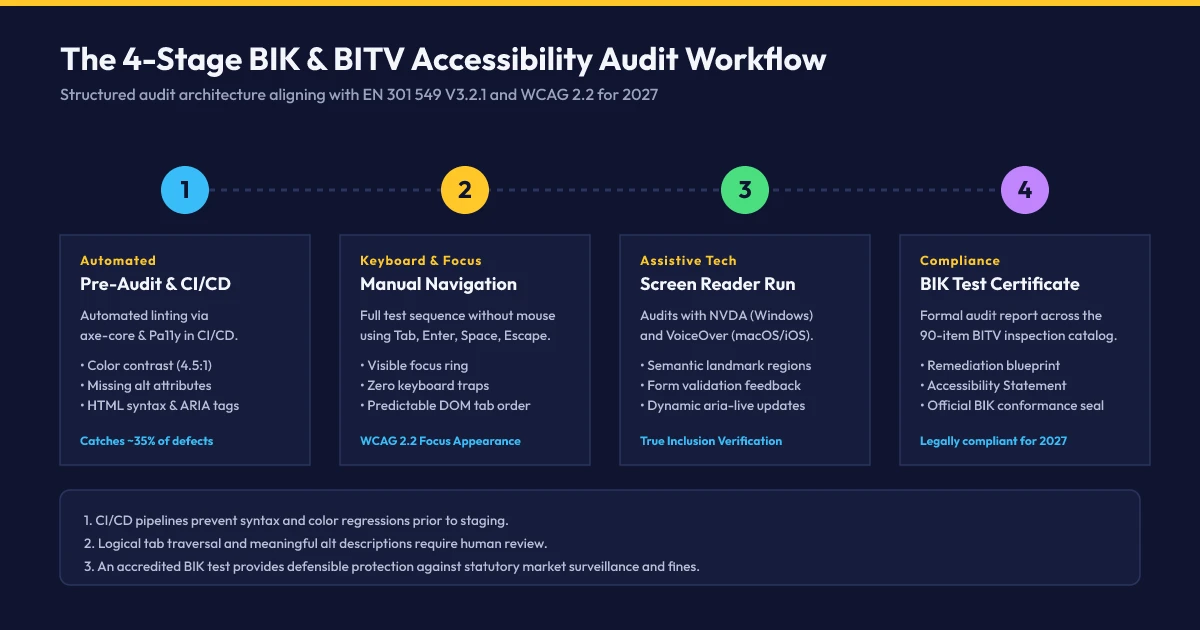
The accredited BIK audit process unfolds across four sequential phases:
-
Phase 1: Pre-Audit & Automated Tooling Scans
Representative sample pages (homepage, service detail, interactive form, checkout flow, error view) are isolated and processed through automated linters to eliminate baseline syntax and contrast defects.
-
Phase 2: Manual Keyboard & Focus Traversal
Certified auditors navigate the entire portal strictly using physical keyboards, verifying tab sequence predictability, focus ring visibility, skip link operation, and focus trapping behavior.
-
Phase 3: Assistive Screen Reader Verification
Real-world testing utilizing NVDA (Windows with Chrome/Firefox) and Apple VoiceOver (macOS/iOS with Safari), verifying auditory comprehension, table indexing, and dynamic notification updates.
-
Phase 4: Defect Remediation & Certification Seal
Issuance of a formal BIK audit report detailing defects. Following remediation verification in a re-test, the digital platform receives the official accredited BIK certification seal („accessible“ or „highly accessible“).
4. Developer Engineering Manual: Clean Frontend A11y Patterns
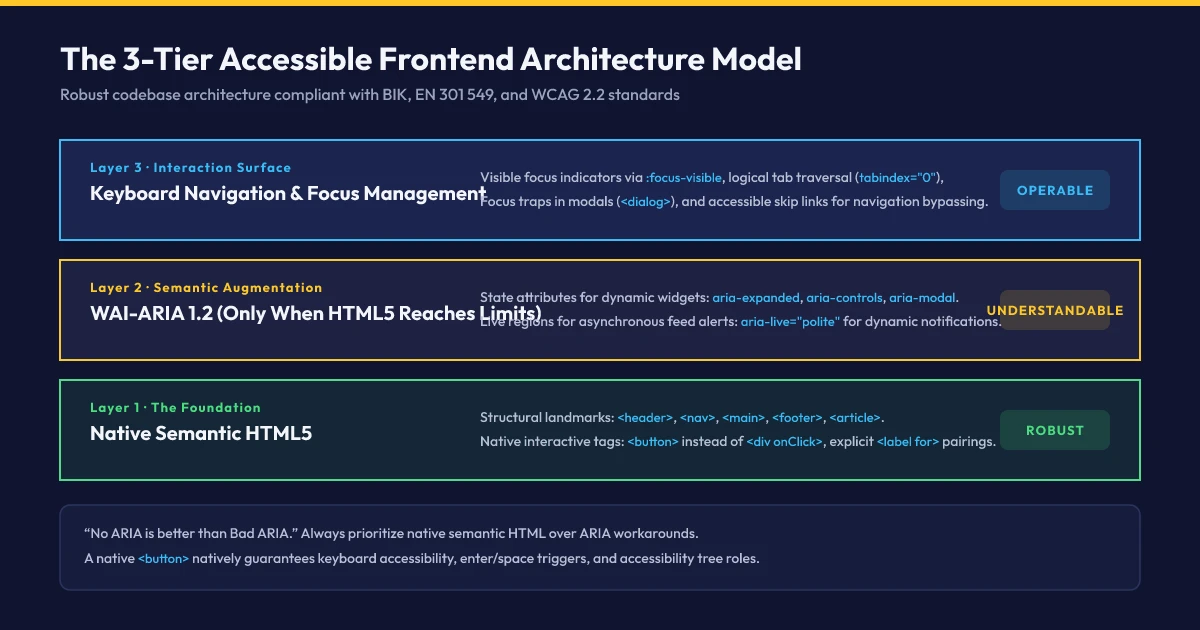
Accessibility failures in enterprise software rarely stem from ill intent; they are typically the byproduct of flawed frontend architectural patterns. Establishing robust HTML5 primitives eliminates hundreds of hours of remediation down the line:
Pattern 1: The Accessible Accordion (FAQ / Submenu)
A frequent anti-pattern is binding event listeners to unstyled <div onClick> tags devoid of keyboard focus or ARIA states. The BIK-compliant solution uses a native button element paired with aria-expanded:
<!-- Accessible Accordion Component -->
<div class="faq-item">
  <h3>
    <button
      type="button"
      id="faq-btn-1"
      class="faq-trigger"
      aria-expanded="false"
      aria-controls="faq-panel-1">
      What criteria does the BIK BITV audit encompass?
      <span class="icon" aria-hidden="true">+</span>
    </button>
  </h3>
  <div
    id="faq-panel-1"
    role="region"
    aria-labelledby="faq-btn-1"
    class="faq-content"
    hidden>
    <p>The audit verifies over 90 standardized criteria from EN 301 549...</p>
  </div>
</div>
JavaScript controllers need only toggle the aria-expanded="true|false" attribute alongside the native hidden boolean property. Screen readers immediately announce: „Button, What criteria..., collapsed“ or „expanded“.
Pattern 2: Accessible Modals Using Native HTML5 <dialog>
Custom modal overlays have historically introduced severe accessibility bugs: focus leaking into obscured background layers, screen readers vocalizing hidden markup, and trapped pointer focus. The native HTML5 <dialog> element resolves these challenges at the browser engine level:
<!-- Native Accessible Modal Dialog -->
<dialog id="inquiry-dialog" aria-labelledby="dialog-title" aria-modal="true">
  <div class="dialog-body">
    <h2 id="dialog-title">Request a Project Consultation</h2>
    <form method="dialog">
      <label for="corporate-email">Corporate Email Address:</label>
      <input type="email" id="corporate-email" required />

      <div class="dialog-actions">
        <button type="submit" value="cancel">Cancel</button>
        <button type="submit" value="confirm" class="btn-primary">Submit</button>
      </div>
    </form>
  </div>
</dialog>
Triggering dialog.showModal(); automatically makes underlying document layers inert, confines tab focus exclusively within the modal container, listens for the Escape key, and restores focus to the triggering element upon dismissal.
Pattern 3: WCAG 2.2-Compliant Focus Rings via CSS
The single most widespread defect across modern websites remains the unconsidered removal of outline styles. An accredited focus indicator must provide unambiguous contrast against both the active element and surrounding background:
/* BIK & WCAG 2.2-compliant high-contrast focus indicator */
:focus-visible {
  outline: 3px solid #ffc829 !important; /* High-contrast gold accent */
  outline-offset: 3px !important;
  box-shadow: 0 0 0 5px rgba(15, 20, 48, 0.9) !important; /* Deep navy boundary shadow */
  transition: outline-offset 0.15s ease-in-out;
}

/* Never purge focus styles without declaring visible replacements */
a:focus, button:focus, input:focus {
  /* Leverage browser native focus-visible heuristic */
}
Engineering Tip: Skip Links for Keyboard Users
Always place a functional bypass anchor as the first direct child of your <body>: <a href="#main-content" class="skip-link">Skip to primary content</a>. Style it offscreen via CSS (transform: translateY(-100%)), transitioning it into visible viewport display upon the user's initial Tab keystroke. This prevents keyboard navigators from cycling through repetitive navigation menus on every page visit.
5. Testing Methodologies Compared: Linters vs. Overlays vs. Accredited Audits
Organizations evaluating accessibility tooling encounter a wide spectrum of vendor promises. Understanding precisely where automated engines succeed—and where manual human auditing remains indispensable—is key to strategic resource allocation:
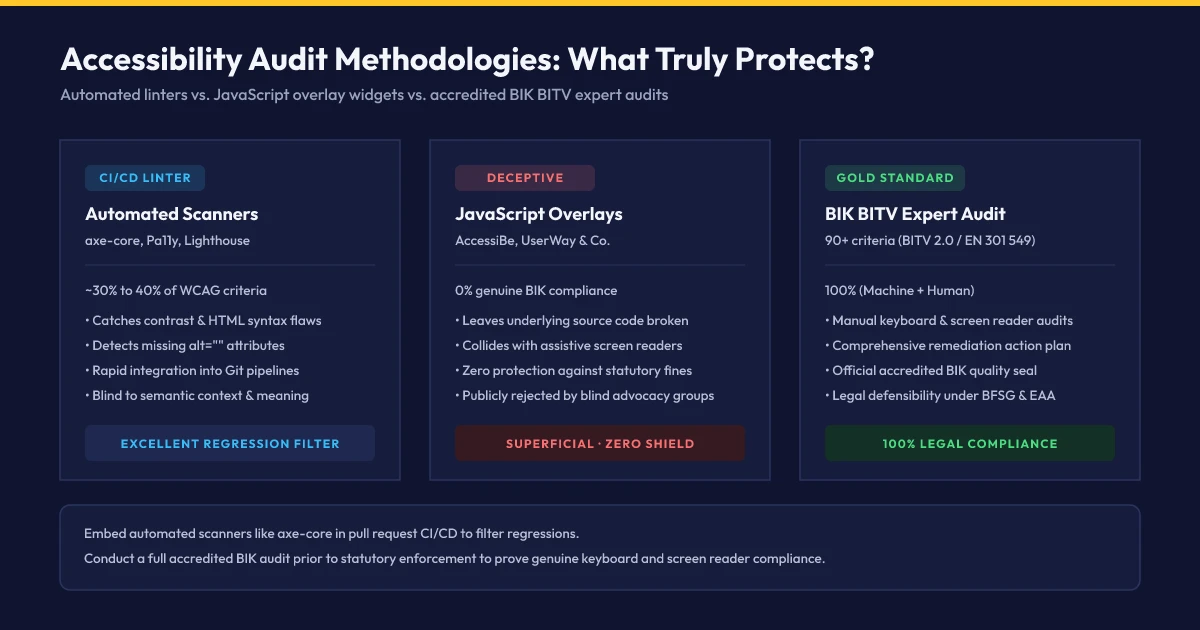
Comparative Analysis: Automated CI/CD Scanners vs. BIK BITV Expert Audits
- Test Coverage: Uncovers roughly 30% to 40% of WCAG criteria automatically (color contrast, missing alt attributes, malformed HTML syntax).
- Pipeline Integration: Ideal as automated regression gates within Git pull request workflows prior to production merges.
- Cost Efficiency: Negligible marginal cost as open-source libraries embedded directly into modern build tooling.
- Operational Limits: Blind to whether alt descriptions convey contextual meaning or whether focus orders are intuitive.
- Test Coverage: 100% comprehensive verification of EN 301 549 across 90+ standardized inspection checkpoints.
- Scope: Authoritative baseline prior to enterprise relaunches, certification ahead of 2027, and legally defensible documentation.
- Methodology: Certified human auditors rigorously testing real-world keyboards and assistive screen readers (NVDA, VoiceOver).
- Legal Security: Exhaustive audit reports and accredited certification seals provide statutory immunity against fines and litigation.
6. The Overlay Fallacy: Why Widgets Fail Official Regulatory Audits
Over recent years, vendors of so-called Accessibility Overlays (such as AccessiBe or UserWay) marketed an allegedly effortless fix: injecting a single line of JavaScript code would supposedly render any legacy website instantly compliant and lawsuit-proof via artificial intelligence.
The reality in 2026/2027 is unequivocal: These client-side widgets merely modify surface CSS styles (such as contrast filters or enlarged font sizing) inside the user's local browser window, leaving underlying source code defects completely unaddressed. Over 800 international accessibility researchers, leading blind advocacy organizations, and regulatory authorities have issued formal warnings via the Overlay Fact Sheet:
- Screen Reader Interference: Overlays frequently inject conflicting ARIA tags that override or break native screen reader shortcuts and operating system accessibility hooks.
- Zero BIK Conformance: During official BIK certifications and regulatory EAA enforcement checks, automated overlay scripts are disabled by default because EN 301 549 demands accessibility within the native source markup.
- Increased Litigation Vulnerability: Opportunistic plaintiff law firms actively crawl the web for identifiable overlay script tags, treating their presence as clear evidence of unresolved backend code liabilities.
7. 60-Day Implementation Roadmap & Developer Quick-Check
To bring your web properties and digital products into verifiable BIK conformance well ahead of the 2027 enforcement deadline, we recommend executing this structured 60-day engineering sprint:
-
Days 1–10: Automated Baseline Scanning & Template Audits
Integrate axe-core or Pa11y into your CI/CD pipeline. Scan primary template archetypes and eliminate baseline syntax, label, and contrast violations.
-
Days 11–25: Focus Management & Interactive Component Refactoring
Audit all interactive controls (navigation, search inputs, flyouts, and dialogs). Implement high-contrast
:focus-visibleindicators, eliminate keyboard traps, and configure skip links. -
Days 26–40: Forms & Dynamic Interaction Optimization
Ensure 100% of input controls are explicitly bound to programmatic
<label for>tags. Implement accessible inline error validation with descriptive ARIA live announcements. -
Days 41–50: Manual Screen Reader Validation
Conduct hands-on test scripts with NVDA (Windows) and VoiceOver (macOS), verifying reading sequence logic, table structures, and dynamic UI state announcements.
-
Days 51–60: Accessibility Statement & BIK Certification
Publish an updated, compliant Accessibility Statement featuring a working direct feedback channel and submit your application for the official BIK certification seal.
Quick-Check: 5 Immediate Tests for Frontend Teams
Planning an accredited accessibility audit according to BIK & EN 301 549?
Request an Accessibility Audit Consultation8. Standards, Harmonized Norms & Official Documentation
- BIK für Alle / BIK BITV Test: Official inspection methodology for accessible digital products according to BITV 2.0 and EN 301 549 (bik-fuer-alle.de, Status: 2026/2027).
- W3C Web Accessibility Initiative (WAI): Web Content Accessibility Guidelines (WCAG) 2.2 Recommendation (w3.org/TR/WCAG22/).
- ETSI EN 301 549 V3.2.1: Harmonized European Standard for ICT products and services accessibility requirements (etsi.org).
- European Commission EAA Guidance: Directive (EU) 2019/882 on the accessibility requirements for products and services (eur-lex.europa.eu).
- Overlay Fact Sheet: Independent joint statement by over 800 international accessibility professionals documenting the risks of automated overlay widgets (overlayfactsheet.com).
Our Regional Expertise
We are your digital partner – regionally anchored and successfully scaling across borders.

Accessibility (BFSG) for your business?
I deliver this for small and mid-sized businesses: at a fixed price agreed upfront, working directly with the person who builds it. Process, scope and pricing are on the service page.
See service & pricing Or request a free intro callExtended Specialized Glossary
Barrierefreiheitsstärkungsgesetz (BFSG)
The German national statutory act transposing the European Accessibility Act (EAA) into federal law. Mandates digital services and online commerce adhere to EN 301 549 and WCAG standards.
WCAG
Web Content Accessibility Guidelines: The global W3C technical standard defining accessible digital experiences across Levels A, AA, and AAA.
Accessibility Statement
A legally mandated public disclosure on websites detailing the technical level of compliance, identified non-conformances, and a dedicated feedback channel.
Screen Reader
Assistive software (such as NVDA, JAWS, or Apple VoiceOver) that interprets semantic DOM structures and vocalizes on-screen content or translates it to refreshable braille displays.
ARIA
Accessible Rich Internet Applications: A technical W3C specification introducing descriptive HTML attributes for dynamic interactive states, roles, and accessible names.