


weclapp is a cloud ERP for small and mid-sized businesses: CRM, inventory management, projects and accounting in one system. It gets interesting when weclapp has to work together with a shop, shipping, banking and a tax firm. This guide shows what the weclapp API can do, how webhooks are set up and where the limits are.
This article is an in-depth expert contribution from our content cluster. Discover the complete overview on our main page: Accounting & ERP Integration →
- REST API in version 2: Since release 25.15.1 (July 2025), v2 is the default version. According to weclapp, version 1 remains available for at least one year.
- Sign-in with an API token: Every user has their own token. The API may do exactly what that user may do.
- Set up webhooks without programming: Under Global Settings, weclapp reports new, changed and deleted records to your own URL.
- Not in every plan: The ERP Starter plan includes no API. Anyone who wants to automate needs at least ERP Services.
1. weclapp at a glance
According to its company page, weclapp was founded in 2008 and has belonged to the Dutch Exact group since October 2022. On its customer page, weclapp cites more than 20,000 users in over 3,000 organizations. According to the security page, data is processed in the AWS Frankfurt region. The same page cites an ISO/IEC 27001:2022 certification for the Exact group including weclapp.
In terms of content, weclapp covers CRM, inventory and warehouse management, projects and financial accounting with the SKR03 and SKR04 charts of accounts. For automation, this means many processes that would otherwise run across three programs stay in one system. You mainly need interfaces to the outside: to the shop, marketplace, shipping service, bank and tax firm.
2. The REST API: versions, token, queries
weclapp confirms a REST API in its help center and points to its own API documentation for the technical reference. What changes in the API is listed in the API changelog. The key points from it:
Version 2 is the default
With release 25.15.1 of 31 July 2025, v2 became the default version. According to the changelog, version 1 remains available for at least one year. New integrations build on v2, and existing ones should plan the switch.
Filtering, sorting, paging
The filter parameter supports expressions up to conditions, orderBy sorts, and since release 26.20.1 (November 2026) offset skips a number of records. Long queries can also be sent via POST to /query.
Wait times instead of fixed limits
The changelog names no fixed request limits. It does describe the response headers X-Weclapp-Wait-Ms and X-Weclapp-Wait-Reason. A clean integration reads these headers and slows itself down instead of collecting errors under load.
Sign-in uses an API token. According to the help center, every user finds theirs under their name in "My Settings", after signing in again. Important for planning: the API takes over exactly the permissions of that user.
Create a dedicated integration user
If the integration hangs on an employee's token, it breaks as soon as she leaves the company or gets different rights. Better is a separate user only for the integration, with exactly the rights the process needs. The token belongs in a password manager or the credential store of the workflow platform, not in spreadsheets or emails.
3. Setting up webhooks
In weclapp, you set up webhooks without programming. According to the help center, they are found under Global Settings > Integration > Webhooks. You choose the record type, the event (created, changed or deleted) and the URL to which weclapp sends the message.
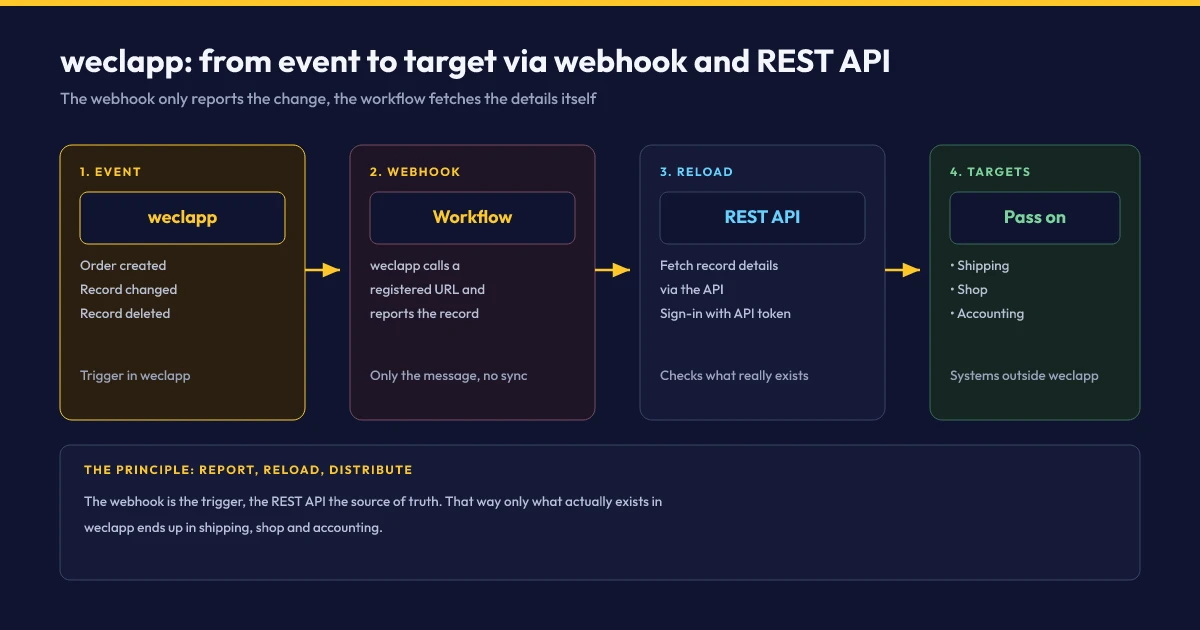
The help page does not describe how a webhook identifies itself to the receiver. The receiving URL should therefore not be guessable, and the receiver should reload every reported record via the API instead of blindly trusting the content of the message. That way, only what actually exists in weclapp ends up in the shop or accounting.
4. Ready-made integrations: shop, shipping, DATEV
Before building yourself, it is worth looking at the integration overview. There, weclapp offers ready-made connections to Shopify, Shopware, WooCommerce and Amazon, to the shipping services Shipcloud and Sendcloud, and to payment providers such as PayPal and Stripe.
For the tax firm, weclapp describes the DATEV connection as a link to the DATEV platform with account assignment and bank reconciliation. Which DATEV services are used exactly is not broken down on the page. You should clarify this with the firm before the project. What the DATEV side looks like technically is covered in the article on the DATEV API.
You usually need custom workflows where the ready-made connections end: for marketplaces without a standard integration, for special rules on prices and stock, or for handovers to systems that weclapp does not know.
5. E-invoicing: ZUGFeRD and XRechnung
weclapp is prepared for the e-invoicing mandate. According to the help center, weclapp generates outgoing invoices as ZUGFeRD in the EN16931 (Comfort) profile according to specification 2.3.1 once the option is activated. On receipt, weclapp reads ZUGFeRD 2.x and XRechnung. For invoices to public authorities, XRechnung can be activated; the customer needs a Leitweg-ID for this.
Outbound Invoices (ZUGFeRD)
weclapp generates outbound e-invoices automatically in the ZUGFeRD 2.3.1 standard (EN16931 Comfort profile). For public administration, XRechnung is activated via routing ID (Leitweg-ID).
Inbound Processing (Inbox)
Inbound e-invoices in ZUGFeRD or XRechnung format are parsed automatically by weclapp. Paired with tools like GetMyInvoices, document collection runs without manual effort.
For automation, the inbound side is the most interesting: pick up invoices from a mailbox or portal, read them into weclapp and present them for review. Tools like GetMyInvoices collect receipts from portals and can serve as a preliminary stage.
6. Which plans include the API
The pricing page distinguishes four packages. For integrations, only one question matters: is the API included?
| Package | API according to the pricing page |
|---|---|
| ERP Starter | no, bookable monthly only and not combinable with other packages |
| ERP Services | yes |
| ERP Trade | yes |
| Enterprise | yes, individual quote from more than 10 licenses |
Current prices per user and month are on the pricing page. If you work with ERP Starter today and want to automate, you should include the package change in your calculation.
7. Typical workflows and checklist
These processes can be automated well with weclapp, a webhook and a workflow platform such as n8n:
Marketplace Orders & Fulfillment
Automatically ingest customer orders from marketplaces without standard connectors, reserve inventory, and initiate shipping label generation.
CRM & Contact Synchronization
Synchronize new CRM accounts directly with downstream ticketing or marketing tools and reflect address changes bidirectionally.
Payment Matching & Reconciliation
Reconcile settled payments from Stripe, PayPal, or bank feeds against open invoices and mark matching online shop orders as paid.
Time Tracking & Project Billing
Import recorded working hours from specialized time trackers into weclapp projects, track project budgets, and generate final invoices.
Quick-Check: weclapp Checklist
If the company outgrows weclapp or already sits in the Microsoft environment, Microsoft Dynamics 365 Business Central is the common next step. For pure invoicing in online retail, a leaner tool such as easybill or sevDesk is often enough. How we implement such connections is shown on the page Accounting & ERP Integration.
Connect weclapp to your shop, shipping or tax firm?
In a free intro call we clarify which processes the ready-made weclapp integrations already cover and where a custom workflow via API and webhooks is needed. You get the fixed price before any work starts.
Book an intro callOfficial Sources & Primary Documentation
- weclapp: API changelog – version 2 as default, filter, offset, wait-time headers.
- weclapp help center: Where do I find the weclapp API token? – token and permissions.
- weclapp help center: How do I integrate webhooks in weclapp? – setup and events.
- weclapp help center: Does weclapp support the ZUGFeRD format? – e-invoicing outbound and inbound.
- weclapp: Integrations – shop, shipping, payment and DATEV connections.
- weclapp: Pricing – packages and API availability.
- weclapp: Certification – ISO/IEC 27001:2022 and hosting in Frankfurt.
Our Regional Expertise
We are your digital partner – regionally anchored and successfully scaling across borders.
Accounting and ERP integration for your business?
I deliver this for small and mid-sized businesses: at a fixed price agreed upfront, working directly with the person who builds it. Process, scope and pricing are on the service page.
See service & pricing Or request a free intro callExtended Specialized Glossary
REST API
An interface through which programs read and write data over HTTP. weclapp provides its data through a REST API.
Webhook
A notification that a system actively sends to a registered URL when something changes. In weclapp, for the creation, change and deletion of records.
ZUGFeRD
A hybrid e-invoice format made of a PDF and embedded XML. weclapp generates outgoing invoices in the EN16931 (Comfort) profile.