


Microsoft Dynamics 365 Business Central is often the central ERP for finance, purchasing, sales and inventory in mid-sized companies. Anyone who wants to connect a shop, CRM, banking or incoming documents automatically will need the Business Central API. This guide shows what API v2.0 can do, how sign-in works without a user license and which limits Microsoft documents.
This article is an in-depth expert contribution from our content cluster. Discover the complete overview on our main page: Accounting & ERP Integration →
- One REST API for the standard objects: API v2.0 covers customers, vendors, items, sales and purchase invoices, general ledger entries and journals. In Business Central online it is active by default.
- Sign-in without a user license: Background services authenticate with OAuth 2.0 (service-to-service). According to Microsoft, this variant needs no separate user license.
- Webhooks instead of polling every minute: Business Central reports changes actively. Subscriptions expire after three days and must be renewed.
- E-invoicing built in: Since version 26.3, the German localization supports XRechnung, ZUGFeRD and Peppol BIS 3.
- 1. What the Business Central API v2.0 covers
- 2. Sign-in: OAuth 2.0 and service-to-service
- 3. Webhooks: learning about changes in real time
- 4. Limits and throttling
- 5. Custom APIs in AL when fields are missing
- 6. E-invoicing and DATEV in Germany
- 7. Integration paths: n8n, Power Automate or a custom service
- 8. Roadmap and checklist
1. What the Business Central API v2.0 covers
Business Central online provides its standard API at a fixed address. According to the Microsoft documentation on endpoints it is https://api.businesscentral.dynamics.com/v2.0/<tenant domain>/<environment>/api/v2.0. Below that, you address a company via companies({id}) and then the entity you want. The same page mentions a monthly update cycle for the API.
The most reliable way to see which entities exist is the list of webhook-enabled resources. For finance and goods processes, these are the most important:
Master data
customers, vendors, items, itemCategories, paymentTerms, paymentMethods, currencies, dimensions. They let you keep customers from a CRM or shop and items from a PIM in sync.
Documents
salesQuotes, salesOrders, salesInvoices, salesCreditMemos and purchaseInvoices. A typical case: a shop order is created as a sales order, and the incoming invoice from the document inbox as a purchase invoice.
General ledger
accounts, generalLedgerEntries, journals and customerPaymentJournals. They carry reports into controlling and payments received from banking back into the ERP.
One restriction is worth knowing before the project: the standard API cannot be extended with custom fields. The API overview says so explicitly. If you need additional fields, you build a custom API page (section 5).
2. Sign-in: OAuth 2.0 and service-to-service
User name and web service access key no longer work in Business Central online. According to Microsoft's list of deprecated features, this basic authentication ended for the online version on 1 October 2022. Only on-premises installations can keep using it for now.
The service-to-service route (S2S) is intended for integrations that run without a signed-in person. It uses the OAuth 2.0 client credentials flow:
- Register an app in Microsoft Entra ID and give it the
API.ReadWrite.Allpermission for Business Central. - In Business Central, enter the app on the Microsoft Entra applications page and assign it permission sets. According to the documentation, an application may not be given the SUPER set.
- Fetch a token from
login.microsoftonline.com/<tenant>/oauth2/v2.0/tokenwith the scopehttps://api.businesscentral.dynamics.com/.default.
Clarify the license question early
For OAuth, the documentation on web services authentication states that no license is needed for service-to-service integrations. An integration on behalf of a user (delegated sign-in), by contrast, runs on that user's license. For background processes, S2S is therefore almost always the better choice. Check the individual case in Microsoft's licensing guide.
3. Webhooks: learning about changes in real time
Instead of asking for new invoices every few minutes, the integration subscribes to an entity. Business Central then sends a webhook notification when something changes. The documentation on subscriptions describes the rules that matter in practice:
Handshake & Validation
When a subscription is created and renewed, the receiver endpoint must promptly return a validation token.
Expiry After 3 Days
Subscriptions lapse after three days without renewal. A scheduled background job that extends them via PATCH is essential.
30-Second Delay
By default, Business Central waits 30 seconds after the first change. If many records change at once, a collection event (collection) is dispatched.
Retry Policy (36h)
If the receiver is unreachable, Business Central retries deliveries over 36 hours. Any error response other than 408, 429, or 5xx deletes the subscription.
Payload Retrieval via API
The notification only identifies which record changed. The integration fetches the actual business data afterwards via REST API.
Microsoft has removed the former delta links and calls webhooks the preferred way to track changes (deprecations from version 24).
4. Limits and throttling
Business Central online limits the load per user, including for applications. The values come from the page Operational limits for Business Central online (page dated December 2025):
| Limit | Value according to Microsoft | Consequence when exceeded |
|---|---|---|
| OData requests per user | 6,000 in a sliding 5-minute window | HTTP 429 |
| Concurrent requests per user | 5, further ones wait in a queue | HTTP 503 after waiting |
Operations per $batch | 100 | Request is rejected |
| Webhook subscriptions | 200 per environment | no further subscriptions |
According to the same page, the limits apply equally to all user types, including S2S applications. For the time limit of a single request, Microsoft gives different values in two places: 8 minutes in the operational limits, 10 minutes on the page on API limits. It is best to plan with the smaller value. The same page requires retry logic with a wait time on HTTP 429. An integration that cannot do this loses data during load peaks.
5. Custom APIs in AL when fields are missing
If a field or table is missing in the standard API, you build a custom API page in AL, the development language of Business Central. According to the documentation on the API page type, such pages are versioned, support webhooks and speak OData v4. Publisher, group and version appear in the URL, for example /api/<publisher>/<group>/v1.0/companies({id})/…. This keeps custom extensions from colliding with Microsoft's standard API.
Webhooks are not available for custom APIs in every case. According to the subscription documentation, API queries, temporary tables and tables with a composite key are among those excluded. If you want to report changes to such data, you need a different trigger.
Check older integrations
Many existing integrations publish Microsoft standard pages directly as a web service. According to the list of deprecated features, this is no longer possible as a SOAP endpoint from version 29 (October 2026), and as an OData endpoint from version 30 (2027, first release wave). Such connections should move to API v2.0 or custom API pages now.
6. E-invoicing and DATEV in Germany
For the e-invoicing mandate, Business Central brings the E-Document framework. According to the Microsoft documentation on German e-invoicing, the German localization has supported XRechnung (UBL only), Peppol BIS 3 and ZUGFeRD since version 26.3. From received ZUGFeRD PDFs, Business Central reads the embedded XML. Two details from the same page matter for planning:
One Format per Profile
A document sending profile in Business Central supports exactly one format. Customers with different requirements (e.g., XRechnung vs. ZUGFeRD) need separate profiles.
Verification Before Posting
A received e-document does not automatically become a posted purchase invoice. Review, validation, and assignment remain a separate step well suited to automation.
The Microsoft documentation on the German localization does not describe a DATEV export. It lists a data export for digital tax audits, but no DATEV interface. In practice, DATEV connections come through partner apps or a custom integration. The article on the DATEV API explains what the DATEV side looks like.
7. Integration paths: n8n, Power Automate or a custom service
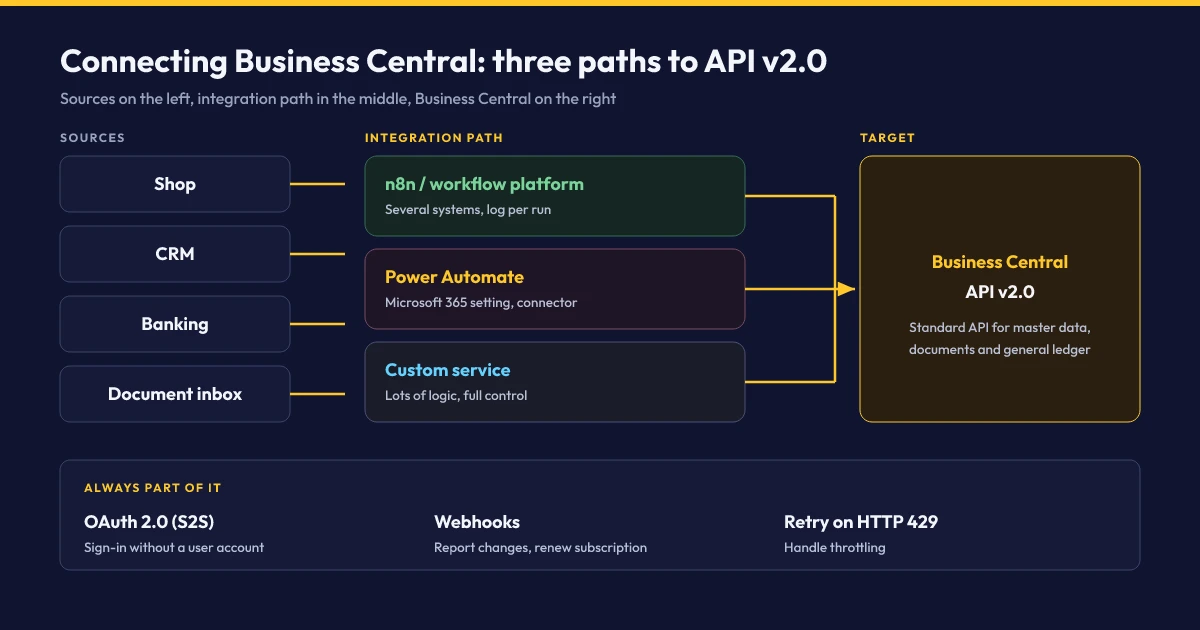
Which path fits depends less on Business Central than on the other systems:
Workflow platform (e.g. n8n)
Good when several systems are involved: shop, banking, document inbox, DATEV. The platform fetches the OAuth token, accepts webhooks, retries on HTTP 429 and logs every run. How this is built is shown in the comparison n8n vs. Make vs. Zapier.
Power Automate
An obvious choice if the company already works in Microsoft 365. The Business Central connector is a premium connector and is throttled to 300 calls per connection per minute. According to the subscription documentation, it cannot process collection events from webhooks.
Custom service
Makes sense for large data volumes or a lot of custom logic, for example price calculation for B2B shops. More effort in operation, but full control over batches and error handling.
8. Roadmap and checklist
A Business Central integration can be built in four manageable steps:
- Define the data flow: Which system is the leading one for customers, items, prices and documents? Maintaining the same data in two places is the most common source of errors.
- Set up access: Register the app in Entra ID, enable it in Business Central with the required permission sets, and test in a sandbox environment first.
- Check for gaps: Is the standard API enough, or do you need custom API pages in AL?
- Secure operations: Webhook renewal, retries on 429, logging and an alert on errors.
Quick-Check: Business Central Checklist
For other programs in the series, similar questions often have different answers. Smaller businesses without their own ERP team often end up with a leaner cloud ERP such as weclapp, tax firms and their clients with Agenda or BMD. An overview of our work on such connections is on the page Accounting & ERP Integration.
Connect Business Central to your shop, banking or document inbox?
In a free intro call we clarify which systems should connect to Business Central and which path fits: workflow platform, Power Automate or a custom service. You get the fixed price before any work starts.
Book an intro callOfficial Sources & Primary Documentation
- Microsoft Learn: Endpoints for the APIs for Dynamics 365 Business Central – address scheme and update cycle.
- Microsoft Learn: Using Service to Service Authentication – client credentials flow, scope and permissions.
- Microsoft Learn: Web services authentication – OAuth as the recommended sign-in, license note on S2S.
- Microsoft Learn: Working with webhooks in Dynamics 365 Business Central – subscriptions, expiry, retries, supported entities.
- Microsoft Learn: Operational limits for Business Central online – request, batch and subscription limits.
- Microsoft Learn: API page type – custom APIs in AL.
- Microsoft Learn: Deprecated features in the platform – basic auth, delta links, web services on standard pages.
- Microsoft Learn: Electronic invoicing in the German version – XRechnung, ZUGFeRD, Peppol BIS 3.
Our Regional Expertise
We are your digital partner – regionally anchored and successfully scaling across borders.
Accounting and ERP integration for your business?
I deliver this for small and mid-sized businesses: at a fixed price agreed upfront, working directly with the person who builds it. Process, scope and pricing are on the service page.
See service & pricing Or request a free intro callExtended Specialized Glossary
REST API
An interface through which programs read and write data over HTTP. Business Central provides its standard API as a REST service based on OData v4.
Webhook
A notification that a system actively sends to a registered URL when something changes, instead of another system having to poll regularly.
XRechnung
The German XML standard for electronic invoices, which Business Central generates in the German localization through the E-Document framework.