


Manual administrative chores between email inboxes, CRM platforms, and sprawling spreadsheets siphon hundreds of productive hours from mid-market teams every month. In this actionable n8n Beginner Tutorial for 2026, you will master the leading open-source automation platform from the ground up: build custom workflows, process webhooks, and integrate modern AI agents without proprietary vendor lock-in.
This article is an in-depth expert contribution from our content cluster. Discover the complete overview on our main page: n8n Automation →
From Manual Copy-Pasting to Autonomous Digital Pipelines: Why n8n is Reshaping Enterprise Productivity
Organizations pursuing digital transformation repeatedly hit the same structural bottlenecks: sales teams manually transcribing inbound leads from inboxes to CRMs, operations managers stitching together disconnected CSV exports, and proprietary SaaS platforms like Zapier levying exorbitant price hikes as transaction volumes scale. More critically, data governance has become an existential concern: transmitting confidential customer, medical, or financial records through US-hosted multi-tenant SaaS clouds introduces severe regulatory liability under GDPR and the EU AI Act. n8n provides an engineering-grade alternative. As a visual, open-source workflow engine, n8n merges the intuitive drag-and-drop velocity of no-code tools with the unconstrained programmatic power of full-stack software development. In this comprehensive beginner's guide, you will learn step-by-step how to construct robust, enterprise-ready pipelines.
100% Data Sovereignty & Regulatory Compliance
Deploy n8n via Docker on private European virtual machines (e.g. IONOS, Hetzner) or on-premise servers. Sensitive enterprise data remains strictly within your security perimeter, satisfying GDPR and NIS-2 mandates.
Zero Task Penalties or Scaling Tollbooths
While closed SaaS engines charge per task invocation, a self-hosted n8n cluster executes millions of workflow steps at zero incremental software licensing cost. You pay solely for base compute infrastructure.
Native AI Agents & LangChain Integration
In version 1.x releases, n8n incorporates first-class AI Agent nodes, allowing teams to interconnect state-of-the-art LLMs (OpenAI, Anthropic Claude, Google Gemini, or local models via Ollama) directly into deterministic business logic.
- 1. What is n8n and What is it Used For in Mid-Market Enterprises?
- 2. The n8n Anatomy: Nodes, Triggers & the JSON Data Stream
- 3. Installation & Setup: Production-Ready in 5 Minutes (Docker vs. Cloud)
- 4. Hands-on Project: Automated Inbound Lead Pipeline
- 5. The Next Frontier 2026: Intelligent Workflows with AI Agents
- 6. Common Beginner Mistakes & Production Best Practices
- 7. Self-Hosting vs. Professional n8n Consulting & Systems Integration
- 8. References & Official Engineering Documentation
Context & Strategic Scope: While our architectural analysis on n8n Automation for Mid-Market Enterprises covers macro-level IT modernization and our guide to n8n Data Sovereignty details legal compliance, this tutorial serves as an interactive, hands-on engineering manual. You will dissect node architectures, understand runtime execution contexts, and deploy production workflows.
1. What is n8n and What is it Used For in Mid-Market Enterprises?
The name n8n is a numeronym for „nodemation“ (node-based automation). Functionally, it is an Integration Platform as a Service (iPaaS) enabling developers and operations engineers to connect databases, web services, and internal enterprise applications through an intuitive browser canvas.
In traditional IT environments, integrating two systems—such as transmitting Shopify orders to an SAP enterprise resource planning system or registering lead webhooks into HubSpot—required bespoke glue code. These custom scripts require maintenance overhead, break when third-party APIs update, and consume costly engineering resources. n8n solves this fragility by providing hundreds of standardized, production-tested nodes.
Comparative Analysis: Closed Cloud SaaS vs. Self-Hosted n8n
- The Task Volume Trap: Metered execution billing; high-throughput pipelines exceeding 50,000 steps quickly incur massive monthly fees.
- Third-Party Data Routing: Workflows process business records across multi-tenant US cloud servers outside strict GDPR jurisdiction.
- Restricted Execution Sandbox: Tight timeout windows, restricted memory thresholds, and no ability to import custom npm packages.
- Vendor Lock-In: Workflows cannot be exported as version-controlled code or executed on private enterprise infrastructure.
- Predictable Compute Costs: Fair-code licensing without artificial task meters; unlimited executions on self-hosted instances.
- 100% Data Sovereignty: Deployed in ISO-27001-certified European data centers or on-premise without third-party data egress.
- Boundless Extensibility: Native JavaScript and Python scripting with full npm module support for complex algorithms.
- Native AI Orchestration: Built-in LangChain and Model Context Protocol (MCP) nodes connect arbitrary LLMs with internal systems.
Typical Mid-Market Enterprise Use Cases
Automated n8n pipelines span lightweight administrative shortcuts to core revenue-generating infrastructure:
Proven Enterprise Workflows Built with n8n
2. The n8n Anatomy: Nodes, Triggers & the JSON Data Stream
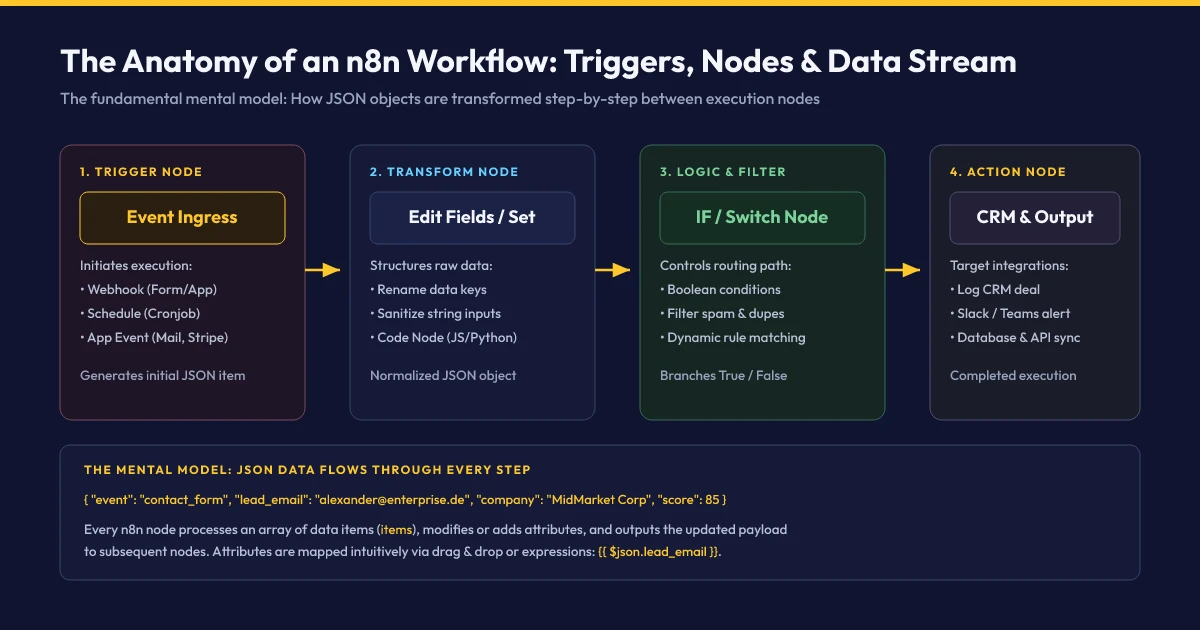
Operating n8n efficiently does not require deep software engineering credentials—you simply need to understand how the platform models and moves data between nodes. The architecture below illustrates the fundamental flow:
The 3 Foundational Node Categories
Every node on the visual canvas performs a discrete programmatic operation within the execution chain:
-
1. Trigger Nodes (The Ingress Spark)
A workflow never executes spontaneously—it requires an explicit ingress event. Typical triggers include an inbound HTTP request (Webhook), a cron-like timer (Schedule Trigger, e.g. every weekday at 07:00 CET), or polling-based app listeners (e.g. an updated Google Sheets row or an unread IMAP email message).
-
2. Action & Transform Nodes (The Processors)
Once triggered, the payload passes downstream. Transform nodes manipulate data structures: The Edit Fields (Set) node standardizes keys or sets fixed parameters. Code Nodes run sandboxed JavaScript or Python to execute mathematical formulas or regex matching. HTTP Request Nodes interface with external arbitrary REST APIs.
-
3. Logic & Routing Nodes (The Traffic Controllers)
Enterprise workflows are rarely strictly sequential. The IF Node branches execution into binary paths (True / False) based on deterministic criteria (e.g. „Is total order value > €500?“). The Switch Node facilitates multi-branch conditional routing based on categorical matching.
The Data Model: Why JSON is the Universal Contract
Under the hood, all n8n nodes communicate using standardized JSON (JavaScript Object Notation). A node outputs an array of structured objects—designated as items within the n8n execution environment. A sanitized lead record appears as follows:
[
  {
    "json": {
      "first_name": "Alexander",
      "last_name": "Ohl",
      "email": "alexander@enterprise.de",
      "company": "Pragma-Code",
      "inquiry": "We require enterprise n8n workflow integration.",
      "score": 85,
      "timestamp": "2026-11-07T08:00:00.000Z"
    }
  }
]
The elegance of n8n is that manual syntax formatting is minimized. In the GUI, you drag data points from the left-hand output inspection pane directly into the input parameters of downstream nodes. n8n dynamically generates interpolation expressions such as {{ $json.email }}.
3. Installation & Setup: Production-Ready in 5 Minutes (Docker vs. Cloud)
When launching your n8n journey, two deployment strategies cater to different operational priorities:
| Metric | n8n Cloud (Managed) | Self-Hosted (Docker Compose) |
|---|---|---|
| Deployment Velocity | Instant Deployment Sign up and start building in seconds | ~5 to 15 Minutes Requires basic Linux CLI & Docker runtime |
| Data Residency | AWS Frankfurt (EU) Vendor-managed cloud infrastructure | Absolute Control Private VPC, Hetzner, IONOS, or On-Premise |
| Pricing Model | From €20 / Month Capped at 2,500 executions | Zero License Fees (Open Source) Base compute only (~€5 to €15 / month) |
| Lifecycle Maintenance | Automated Patching Managed platform lifecycle |
Inhouse / DevOps
Upgrades executed via docker compose pull
|
Step-by-Step: Deploying n8n Locally or to Virtual Servers via Docker
For unmetered workflow scaling and absolute data sovereignty, Docker Compose represents the production gold standard. Create a deployment directory on your server or workstation and instantiate a docker-compose.yml file:
version: '3.8'

volumes:
  n8n_data:

services:
  n8n:
    image: docker.n8n.io/n8nio/n8n:latest
    container_name: n8n-automation
    restart: unless-stopped
    ports:
      - "5678:5678"
    environment:
      - N8N_HOST=localhost
      - N8N_PORT=5678
      - N8N_PROTOCOL=http
      - NODE_ENV=production
      - WEBHOOK_URL=http://localhost:5678/
      - GENERIC_TIMEZONE=Europe/Berlin
    volumes:
      - n8n_data:/home/node/.n8n
Boot the service daemon in the terminal:
docker compose up -dPoint your browser to http://localhost:5678. On initial launch, the configuration wizard guides you through root administrative account provisioning. Once established, the clean workflow canvas is ready for orchestration.
Production Engineering Tip: SSL Termination
For public cloud deployments, terminate HTTPS upstream using a reverse proxy (such as Nginx, Traefik, or Caddy) equipped with Let's Encrypt certificates. Crucially, set the WEBHOOK_URL=https://n8n.your-company.com/ environment variable to ensure webhook payloads correctly route over encrypted connections.
4. Hands-on Project: Automated Inbound Lead Pipeline
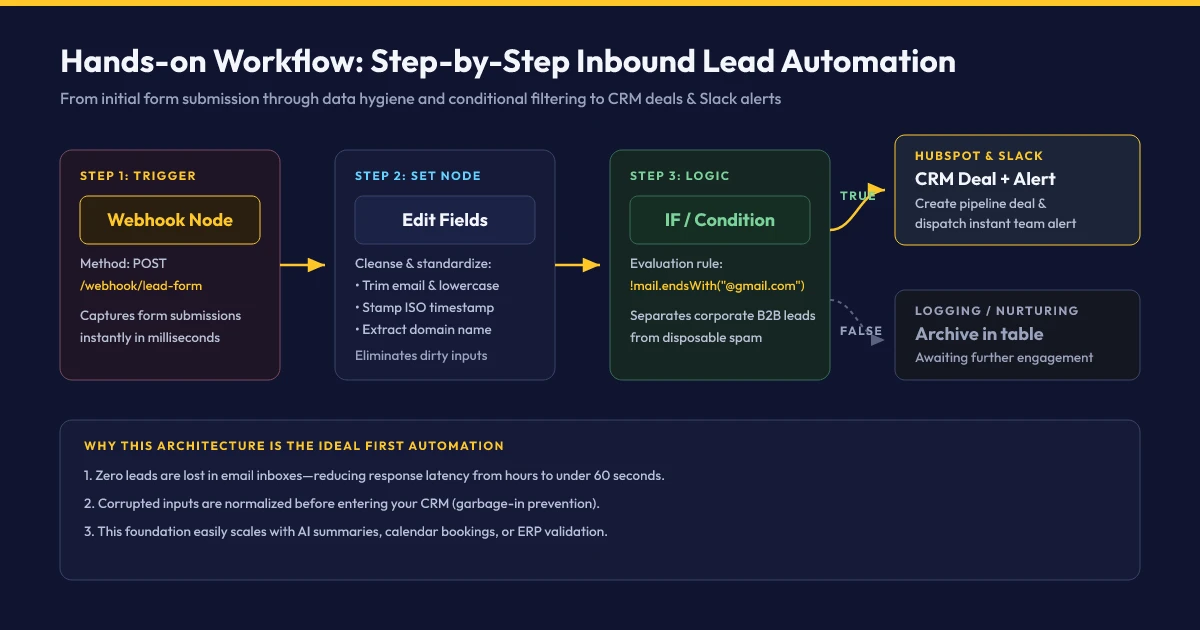
Theoretical concepts solidify when applied to actual operations. In this exercise, we build a foundational enterprise pipeline: Automated Inbound Lead Ingestion, Data Hygiene, and Instant Sales Notification.
Step-by-Step Implementation
Deploy & Configure the Webhook Trigger
On the canvas, click the Plus icon (+), search for „Webhook“, and place the node. Set the HTTP Method to POST and designate the route path as /lead-inbound. n8n exposes two distinct URLs: A Test URL (for interactive debugging) and a Production URL (for live operational traffic).
Dispatch Test Inbound Payload
Click „Listen for test event“ within the Webhook node. In a terminal window, dispatch a synthetic form submission via cURL:
curl -X POST http://localhost:5678/webhook-test/lead-inbound \
  -H "Content-Type: application/json" \
  -d '{"name": "Jane Doe", "email": " JANE@ENTERPRISE-CORP.COM ", "message": "ERP migration inquiry"}'
The canvas node highlights green instantly, rendering the incoming JSON payload in the inspection panel.
Data Hygiene via the Edit Fields (Set) Node
Prospects frequently input formatting irregularities or capitalization. Wire the webhook output to an Edit Fields node. Create a parameter clean_email governed by the expression {{ $json.body.email.trim().toLowerCase() }} and attach an execution timestamp using {{ $now.toISO() }}.
Conditional B2B Validation via the IF Node
To eliminate disposable throwaway addresses, introduce an IF Node. Set validation logic: clean_email does not contain gmail.com and does not contain yahoo.com. Legitimate enterprise domains flow along the upper (True) branch, while generic emails divert to secondary handling.
Downstream Action Dispatch: CRM & Team Alerts
Attach two action sinks to the True terminal: A HubSpot node (Operation: Create Contact & Deal) and a Slack node (Operation: Send Message to #sales-inbound). Format message templates dynamically using expressions like *New B2B Lead:* {{ $json.name }} ({{ $json.clean_email }}).
Instant Workflow Import: Copy-Paste JSON Blueprint
To test this operational pipeline immediately, copy the serialized JSON configuration below, click anywhere on your active n8n canvas, and press Ctrl + V (or Cmd + V on macOS):
{
  "nodes": [
    {
      "parameters": {
        "httpMethod": "POST",
        "path": "lead-inbound",
        "options": {}
      },
      "type": "n8n-nodes-base.webhook",
      "typeVersion": 2,
      "position": [220, 300],
      "id": "node-webhook-1",
      "name": "Webhook Ingress"
    },
    {
      "parameters": {
        "fields": {
          "values": [
            {
              "name": "clean_email",
              "stringValue": "={{ $json.body.email.trim().toLowerCase() }}"
            },
            {
              "name": "processed_at",
              "stringValue": "={{ $now.toISO() }}"
            }
          ]
        },
        "options": {}
      },
      "type": "n8n-nodes-base.set",
      "typeVersion": 3.4,
      "position": [440, 300],
      "id": "node-set-1",
      "name": "Cleanse Data"
    },
    {
      "parameters": {
        "conditions": {
          "string": [
            {
              "value1": "={{ $json.clean_email }}",
              "operation": "notContains",
              "value2": "@gmail.com"
            }
          ]
        }
      },
      "type": "n8n-nodes-base.if",
      "typeVersion": 2,
      "position": [660, 300],
      "id": "node-if-1",
      "name": "Is B2B Lead?"
    }
  ],
  "connections": {
    "Webhook Ingress": {
      "main": [[{"node": "Cleanse Data", "type": "main", "index": 0}]]
    },
    "Cleanse Data": {
      "main": [[{"node": "Is B2B Lead?", "type": "main", "index": 0}]]
    }
  }
}
5. The Next Frontier 2026: Intelligent Workflows with AI Agents
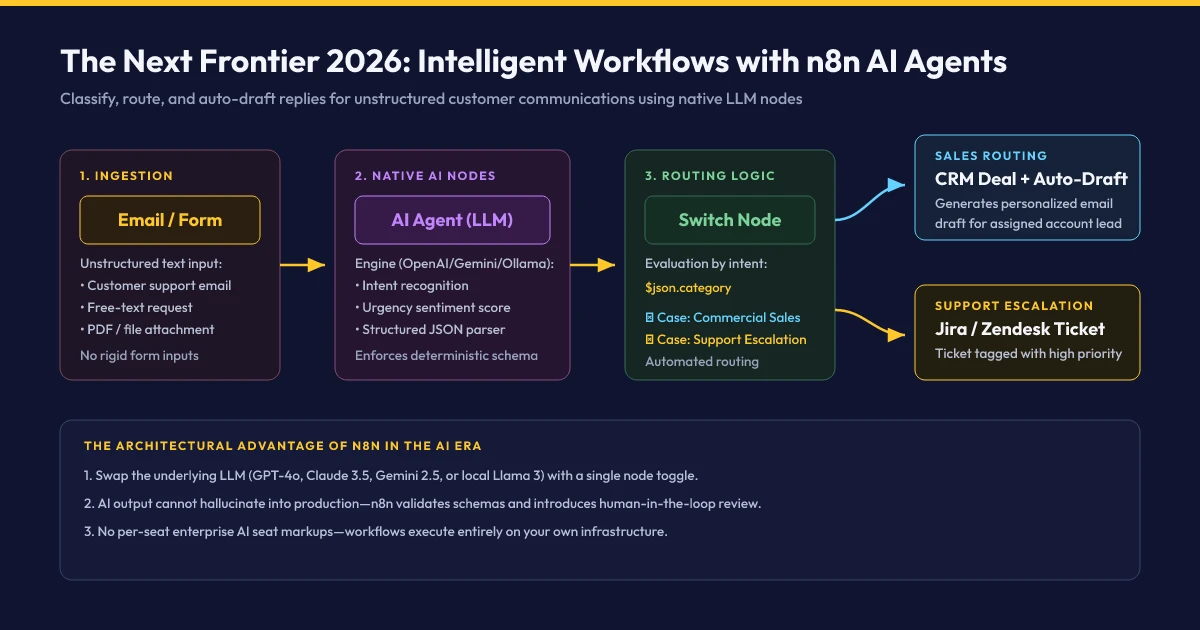
Deterministic automation excels with structured schemas but fails when dealing with unstructured natural language. Inbound customer emails arrive as multi-paragraph narratives containing complaints, purchase inquiries, and technical questions simultaneously. In n8n version 1.x, developers orchestrate frontier language models via native AI Agent nodes directly within business processes:
The 4 Pillars of n8n AI Architecture
n8n leverages open LangChain abstractions visualised into modular components:
1. The AI Agent Node (The Executive Brain)
Acts as orchestrator. You provide system prompts and role directives (e.g. „You are an enterprise support triage agent. Categorize incoming communication, extract priority sentiment, and determine routing.“).
2. Model Connectors (The Cognitive Engine)
Connect downstream LLM providers. n8n natively supports OpenAI (GPT-4o), Anthropic (Claude 3.5 Sonnet), Google Gemini, or on-premise inference engines via Ollama (Llama 3, Mistral) for absolute GDPR air-gapping.
3. Output Parsers (Deterministic Schema Enforcement)
The primary hurdle in LLM workflows is hallucinated formatting. The Auto-fixing Output Parser in n8n forces the model to adhere to a rigid JSON schema, guaranteeing downstream nodes can parse parameters like $json.category reliably.
4. Tools & Memory (Contextual Authority)
Equip the agent with operational agency: Query enterprise SQL databases, retrieve technical documentation via vector vector-store RAG pipelines, or trigger external API endpoints prior to formulating decisions.
6. Common Beginner Mistakes & Production Best Practices
During initial deployment phases, engineering teams encounter recurring operational friction. Adhere to these five architectural rules for robust production systems:
Production Hardening Checklist for n8n Deployments
EXECUTIONS_DATA_PRUNE=true and EXECUTIONS_DATA_MAX_AGE=168 (7 days) to preserve disk space.
7. Self-Hosting vs. Professional n8n Consulting & Systems Integration
For straightforward workflows—such as automating spreadsheet logs or sending internal alerts—n8n is an exceptional DIY tool for technical teams. However, at what inflection point should an organization engage certified enterprise integrators?
Decision Matrix: In-House DIY vs. Professional n8n Consulting
- Standard Workflows: Internal, non-critical operational routines, email alerts, or marketing campaign tracking.
- Moderate Transaction Loads: Hundreds to low thousands of executions weekly without complex distributed state requirements.
- Fault-Tolerant Operations: Temporary pipeline interruptions do not impact revenue generation or financial invoicing.
- Out-of-the-Box Connectors: Direct integration between modern cloud apps via built-in n8n nodes without custom middleware.
- Enterprise & Compliance: Pipelines handle sensitive customer PII, core ERP records, or mandate strict GDPR and NIS2 compliance.
- Scale via Queue Mode: Distributed execution across Redis message queues and decoupled worker containers for high availability.
- Legacy & ERP Integration: Connecting bespoke SOAP, XML, or database interfaces (SAP, DATEV, AS400) with robust retry logic.
- Mission-Critical SLAs: Automated observability, health alerting, disaster recovery failover, and guaranteed enterprise support.
Looking to Automate Enterprise Workflows Securely with n8n?
Schedule a Free Automation Consultation8. References & Official Engineering Documentation (As of November 2026)
- n8n Official Documentation: Comprehensive architectural specifications and node reference guides (docs.n8n.io, Current as of November 2026).
- n8n GitHub Repository & Fair-Code Licensing: Source code, version 1.x release changelogs, and commercial licensing terms (github.com/n8n-io/n8n).
- Docker Hub Official Distribution: Configuration directives and environment variables for container deployment (hub.docker.com/r/n8nio/n8n).
- W3C Webhook & REST Specifications: Industry protocol standards for idempotent HTTP payloads and web architecture (w3.org).
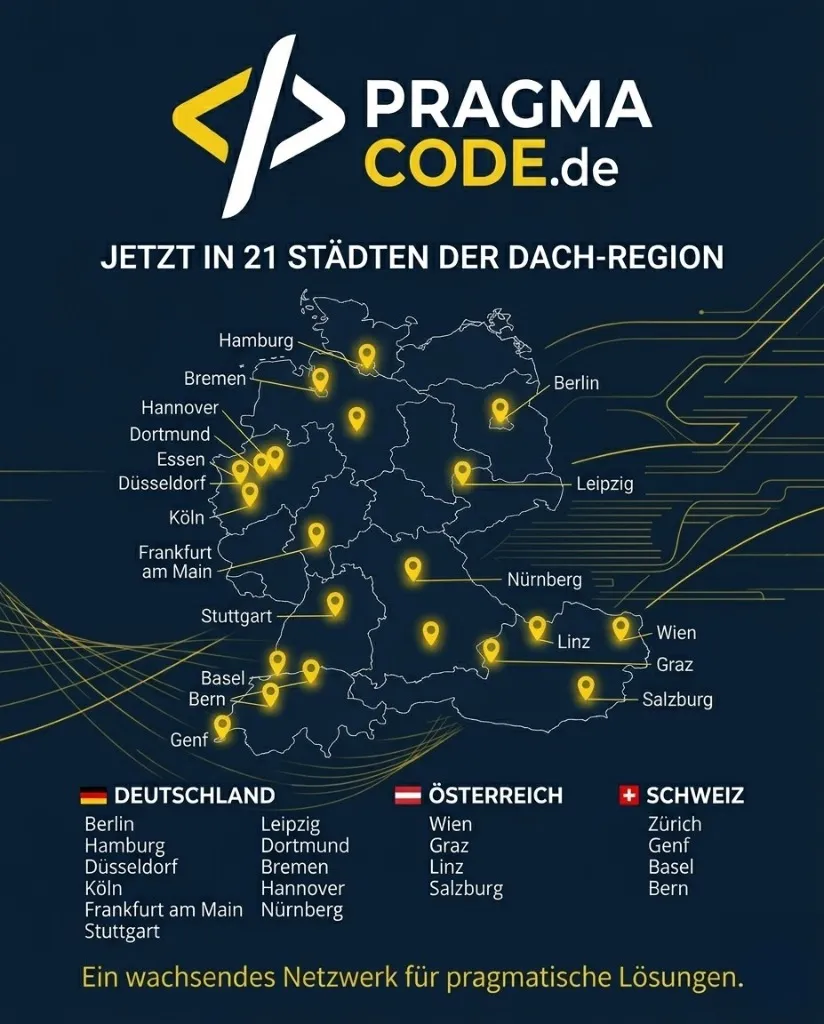
Our Regional Expertise
We are your digital partner – regionally anchored and successfully scaling across borders.
n8n automation for your business?
I deliver this for small and mid-sized businesses: at a fixed price agreed upfront, working directly with the person who builds it. Process, scope and pricing are on the service page.
See service & pricing Or request a free intro callExtended Specialized Glossary
Workflow
The entire logical chain of interconnected steps and transformations that automates an end-to-end business task in n8n.
Webhook
A user-defined HTTP callback delivering real-time payloads to a designated endpoint immediately upon an event occurrence in a source application.
JSON
JavaScript Object Notation: A standardized, lightweight, text-based data format for hierarchical key-value data exchange between networked systems.
API Integration
The architectural bridge connecting disparate software services via formal Application Programming Interfaces (typically REST or GraphQL).
Self-Hosting
Deploying and managing software applications within private on-premise hardware or isolated cloud virtual servers to retain total data custody.
Node
An individual, modular execution block placed on the n8n canvas configured to ingest, transform, filter, or dispatch data payloads.